Plans and pricing
What each SmarterSEO plan costs, how many credits, projects, seats and tracked keywords it includes, and how the lifetime license differs.
SmarterSEO has six monthly plans and one lifetime license. Every tool, tracker, automation and report is available on every plan; what changes is how many credits you receive each month, how many projects you can keep, how many people can join the workspace and how many keywords you can track. This article walks through the plan table and the Billing & credits page where you manage it.
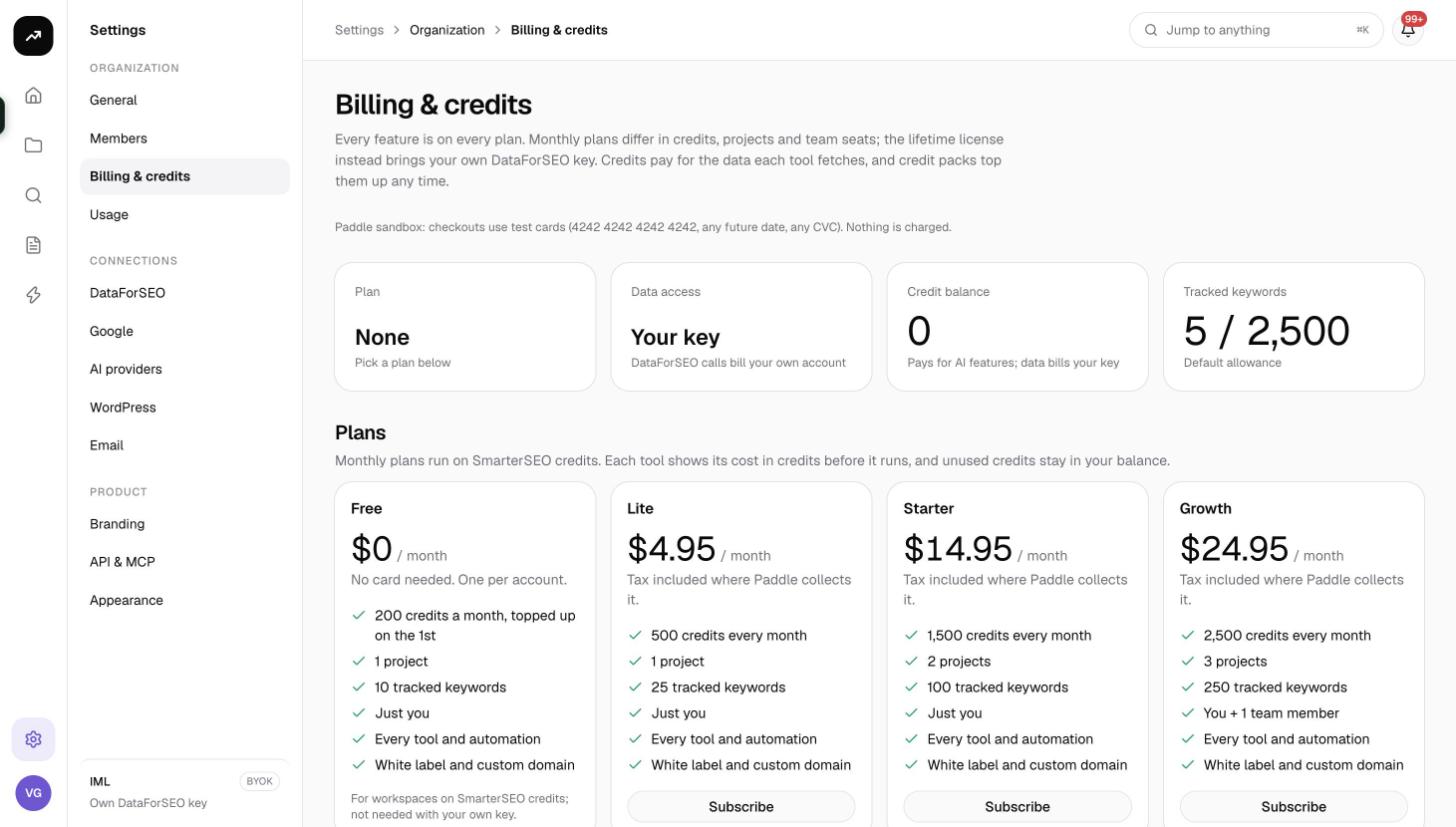
Every feature on every plan
The header of the billing page says it plainly: "Every feature is on every plan. Monthly plans differ in credits, projects and team seats; the lifetime license instead brings your own data provider key. Credits pay for the data each tool fetches, and credit packs top them up any time."
In practice that means:
- Keyword research, competitor and backlink research, SERP tools, AI search visibility, rank tracking, local grids, Search Console and GA4 analytics, content tools, client sharing, automations, white label branding, the REST API and the MCP server are open on Free as much as on Agency.
- Each plan card lists Every tool and automation and White label and custom domain.
- The things that differ are the four numbers in the table below.
The plan table
| Plan | Price | Credits a month | Projects | Seats | Tracked keywords |
|---|---|---|---|---|---|
| Free | $0 | 200 | 1 | 1 | 10 |
| Lite | $4.95 a month | 500 | 1 | 1 | 25 |
| Starter | $14.95 a month | 1,500 | 2 | 1 | 100 |
| Growth | $24.95 a month | 2,500 | 3 | 2 | 250 |
| Pro | $49.95 a month | 5,000 | 5 | 3 | 500 |
| Agency | $99.95 a month | 10,000 | 10 | 6 | 1,000 |
| Lifetime license | $399 once | none (your own key) | Unlimited | 3 | 2,500 |
A few notes on reading it:
- Seats include the owner. Free, Lite and Starter are "Just you"; Growth is "You + 1 team member"; Pro seats three people and Agency six. Pending invitations count toward the seat limit. See Members and roles.
- Projects counts projects that are not archived. If you hit the cap, the app says "The {plan} plan includes N project(s). Archive one, or upgrade under Settings › Billing & credits."
- Credits a month are added at each renewal for paid plans. Free is topped up to 200 once a calendar month rather than receiving 200 more; see Credits explained.
- The Free card says "No card needed. One per account." You can hold one Free workspace per account; other workspaces you create get Free's limits but no credits until they subscribe.
Note: Prices are synced from the payment provider and platform administrators can add badges (such as "Popular") or override limits for a workspace, so the live page may differ slightly from this table.
What counts toward tracked keywords
Only keywords in organic rank trackers count toward the cap, across the whole organization (archived projects included). Archived keywords do not count. Keywords in Search Console trackers, local grids, AI search trackers and saved keyword lists do not count either.
The Tracked keywords tile on the billing page shows "used / cap". When a new tracker would exceed it, the form refuses with "This would track N keywords; your plan allows N. Remove N keywords or archive another tracker."
The lifetime license
The lifetime license is a one-time purchase of $399. Instead of monthly credits it switches the workspace to bring-your-own-key mode: data calls are billed to your own account with the data provider, and the plan card says you bring your own data provider key and that AI features are paid with credit packs. It comes with unlimited projects, 3 seats and 2,500 tracked keywords.
Because data is no longer paid in credits, the lifetime license is the one plan where you still buy credit packs, and only for AI features. Read Bring your own key before choosing it.
The Billing & credits page
Open Settings and choose Billing & credits. The page has, from top to bottom:
- Four stat tiles.
- Plan: the plan name with "Renews {date}", "Ends {date}" if you have cancelled, or "Lifetime license since {date}". On Free it reads "200 credits a month, topped up on the 1st". If another workspace holds your Free slot it reads "Free is used by "{workspace}"; pick a plan below" and "No credits until you subscribe".
- Used this month: credits spent this calendar month, "of N on your plan". On the lifetime license this tile becomes Data access and reads "Your key".
- Credit balance: what is left to spend, with the hint "Spent as tools fetch data; packs add to it" (or "Pays for AI features; data bills your key" on the lifetime license).
- Tracked keywords: used and cap.
- Plan cards, one per plan, with the price, the included numbers and a button: Subscribe, Switch to {Plan}, Current plan, Buy lifetime license, Owned, Cancel your plan first or Included in your license. See Upgrading, downgrading and cancelling.
- Credit packs and the Have a code? box. See Credit packs and codes.
- Credit history, the ledger of grants, purchases and usage. See Usage and history.
Who can buy
Only owners and admins can subscribe, switch plans, buy the lifetime license, buy packs or redeem codes. Members, viewers and clients see the plans but the buttons are replaced by "Owners and admins can purchase."
Checkout and taxes
Checkout opens as a Paddle overlay on the billing page; the payment methods on offer are whatever Paddle presents for your country. After a successful payment you return to the billing page and a Payment received notification appears.
Paid plan cards carry the line "Tax included where Paddle collects it": Paddle acts as the merchant of record and adds or includes VAT or sales tax according to your billing address, so the amount shown at checkout is what you pay.
Tip: If you arrived from a pricing link such as a plan button on the website, the checkout opens automatically once your workspace is created. The banner reads "You chose {Plan}. The checkout opens in a moment; close it to stay on your current plan."