Backlink gap
Referring domains that link to your competitors but not to you, ranked by authority and by how many competitors they already link to.
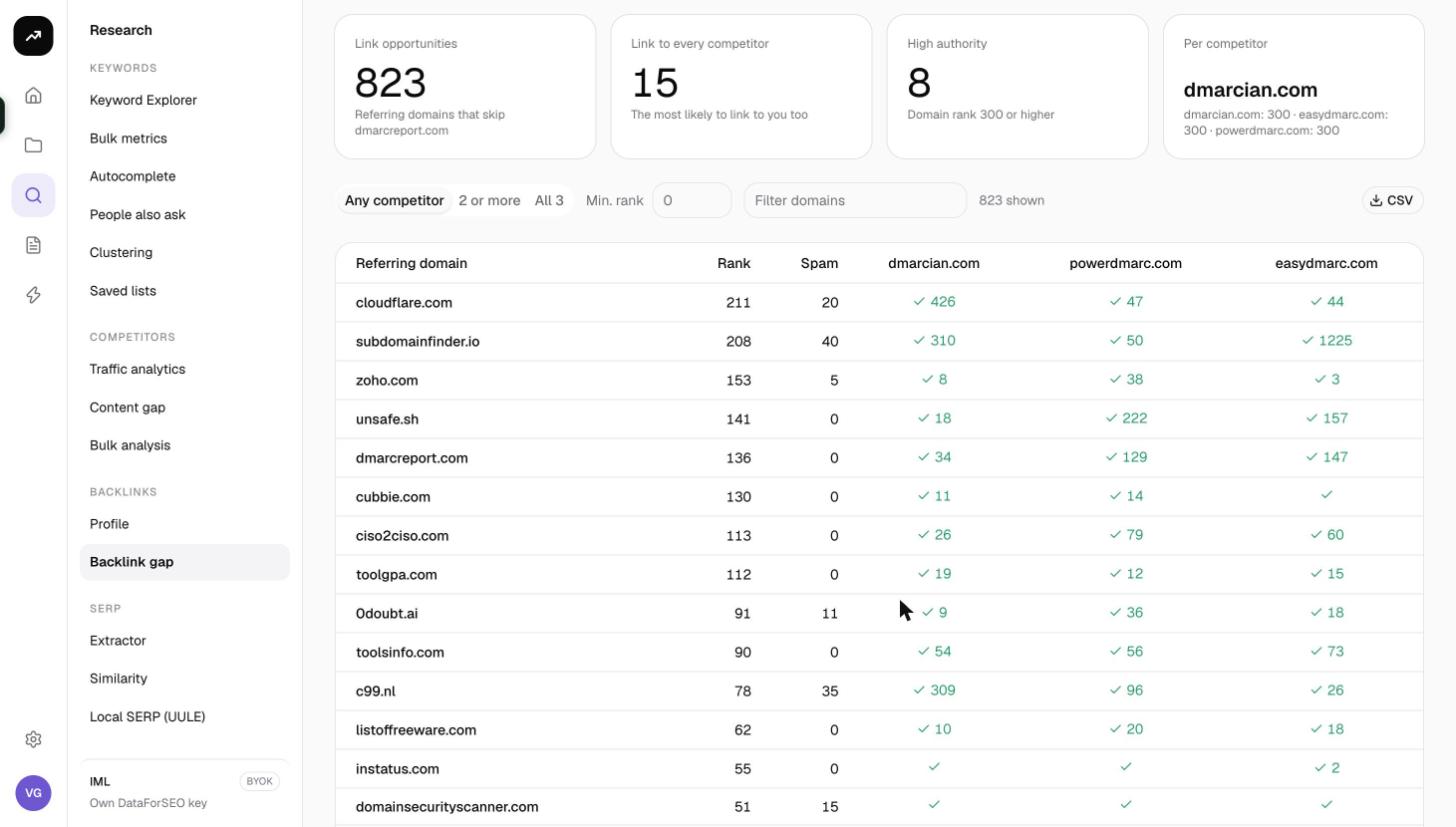
Backlink gap finds link prospects that have already shown they link to sites like yours. You enter your domain and up to five competitors; the tool returns every referring domain that links to at least one competitor and not to you, with its authority, spam score and a tick for each competitor it links to. Domains that link to all of your competitors are the warmest prospects on the list.
What it does
For each competitor, SmarterSEO compares its referring domains with yours and keeps the ones that do not link to you, up to 300 per competitor. The results from all competitors are merged into one list of up to 1,000 domains, each marked with the competitors it links to. Because the comparison uses the backlink index, no market or language applies.
Before you start
- Your domain is required. Enter it as "yourdomain.com".
- Competitors go in the textarea one per line, from one to five. The placeholder reads "one per line, up to five".
- No Market or Language. Backlink data is global, so the form has no locale pickers.
- Role and credits. Viewers cannot run tools. The button is disabled if the estimate exceeds the balance; five competitors are 60 credits.
- Choosing competitors. The Competitors tab of Backlink analytics lists the domains that share the most referring domains with you. Those produce the most relevant gaps. Competitors far above your authority produce long lists of domains that are unlikely to link to you.
Step by step
- Open Research and choose Backlink gap in the Backlinks group (
/research/backlinks/gap). - Enter Your domain.
- Paste up to five domains into Competitors, one per line.
- Check the cost line and click Find link gaps.
- The results page shows the status badge while the comparisons run, then Ready. The page updates automatically and its URL is the permanent link.
Reading the results
Tiles
- Link opportunities: the total number of referring domains that link to at least one competitor and skip your domain.
- Link to every competitor: domains that link to all the competitors you entered, described as "The most likely to link to you too".
- High authority: opportunities with a domain rank of 300 or higher.
- Per competitor: how many opportunities each competitor contributed.
Tabs and filters
- Any competitor (default) shows every opportunity.
- 2 or more keeps domains linking to at least two competitors. It is disabled when you entered only one competitor.
- All N keeps domains linking to all N competitors.
- Min. rank is a number box from 0 to 1,000; raise it to hide low-authority domains.
- Filter domains matches text in the referring domain.
- A counter reads "N shown" and CSV downloads the filtered rows.
Table
| Column | Meaning |
|---|---|
| Referring domain | The domain that links to competitors but not to you |
| Rank | Its domain rank, 0 to 1,000 |
| Spam | Its spam score; skip high values |
| One column per competitor | A tick when the domain links to that competitor; where it links more than once the cell shows the link count instead |
Pagination offers 25, 50, 100 or 250 rows per page (default 100), with "1–100 of N" and "Page X of Y" in the footer. There is no Save to list, because the rows are domains rather than keywords; use CSV to move prospects into your outreach sheet.
Costs
Cost: 12 credits per competitor, so one competitor is 12 credits and five are 60. Gap data is cached for 7 days; repeating the same domain and competitor set within a week is free.
The pre-run figure is an estimate; the charge is the measured cost and is shown on the results page as "N credits for this run".
Tips and gotchas
- The list is capped. Each competitor contributes at most 300 referring domains and the merged list holds at most 1,000. For competitors with very large profiles you see the strongest slice, not every domain. Run a second gap with a different competitor set to widen the net.
- Work from All down. Start with the All N tab and a Min. rank of around 200, then relax both as you run out of prospects. Domains that link to every competitor and have decent authority are usually resource pages, directories and industry publications that will consider you too.
- Watch the Spam column. A domain that links to all five competitors with a spam score of 70 is more likely a link network than a prospect.
- Link counts tell you the type. A cell showing 40 rather than a tick usually means a sitewide or footer link, which is often paid or a partnership rather than an editorial mention.
- Check the prospect before outreach. Run promising domains through Bulk analysis for traffic and spam at once, or through Backlink analytics for the full picture.