Content Gap
Keywords your competitors rank for and you don't, plus the ones where they outrank you, across up to five domains.
Content Gap compares your domain's rankings with up to five competitors and sorts the keywords into three groups: the ones they rank for and you do not, the ones where you rank but they rank higher, and the ones where you already beat everyone. It is the quickest way to turn a competitor list into a content plan.
What it does
For every competitor you enter, SmarterSEO runs two comparisons against your domain in the chosen market: keywords where the competitor ranks and you do not (missing), and keywords where both of you rank (shared). Each comparison returns up to 500 keywords. The shared keywords are then split by who ranks higher. The result is one table with your position and a position column for each competitor, plus a status badge on every keyword.
Before you start
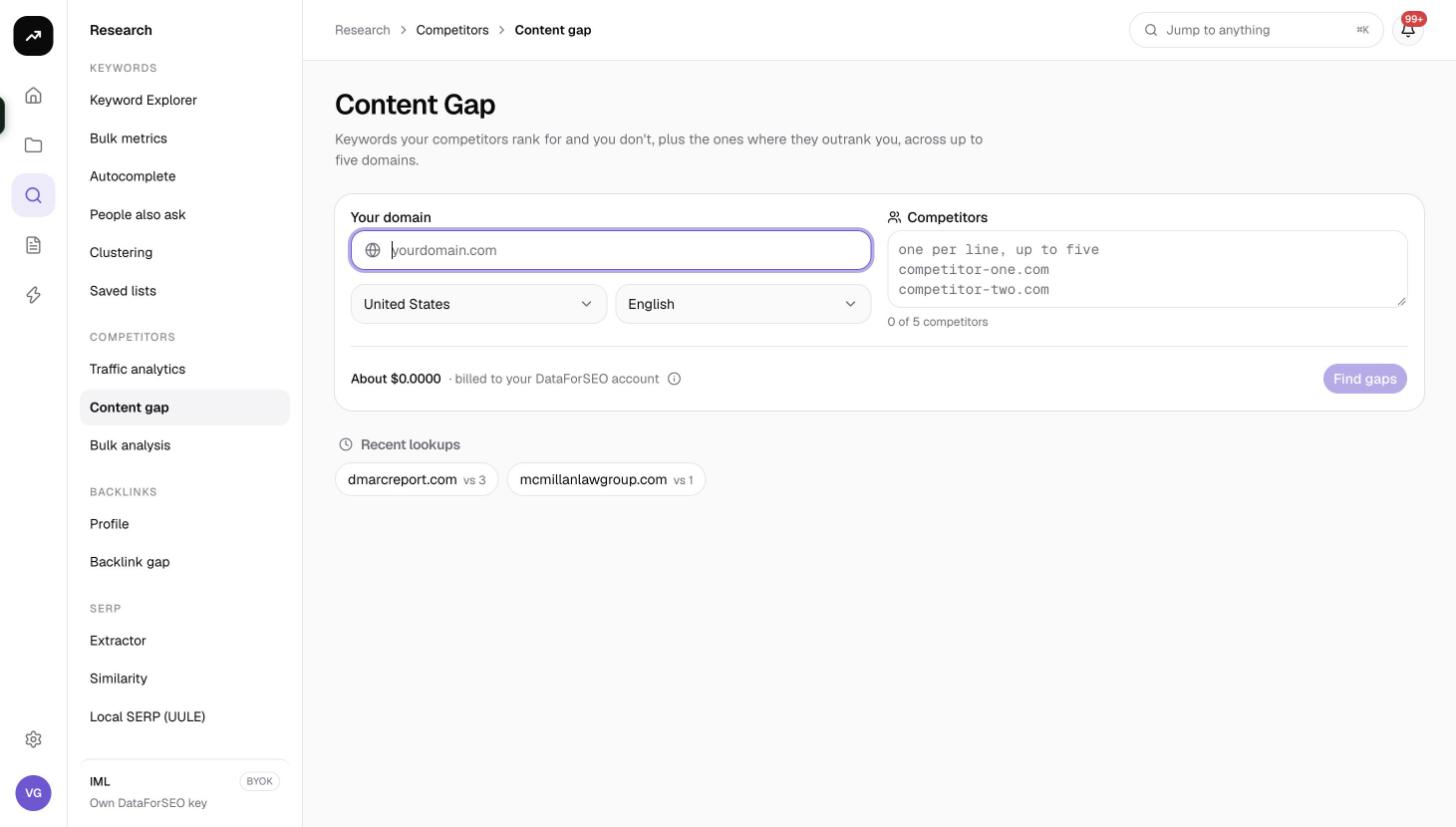
- Your domain is required, together with the Market and Language (defaults United States and English; set both).
- Competitors go in the textarea one per line, up to five. The counter reads "N of 5 competitors". If you accidentally include your own domain it is removed.
- Role and credits. Viewers cannot run tools. The button is disabled if the estimate exceeds the balance; with five competitors the estimate is 160 credits.
- Pick real competitors. The Competitors tab of Traffic Analytics lists the domains that share the most keywords with you, which is a better source than a list of business rivals.
Step by step
- Open Research and choose Content Gap in the Competitors group (
/research/competitors/content-gap). - Enter Your domain.
- Choose the Market and Language.
- Paste up to five domains into Competitors, one per line.
- Check the cost estimate and click Find gaps.
- The results page shows Queued, then Collecting while the comparisons run, then Ready. The page updates automatically and its URL is the permanent link.
Without a result open, the page shows up to eight Recent lookups chips.
Reading the results
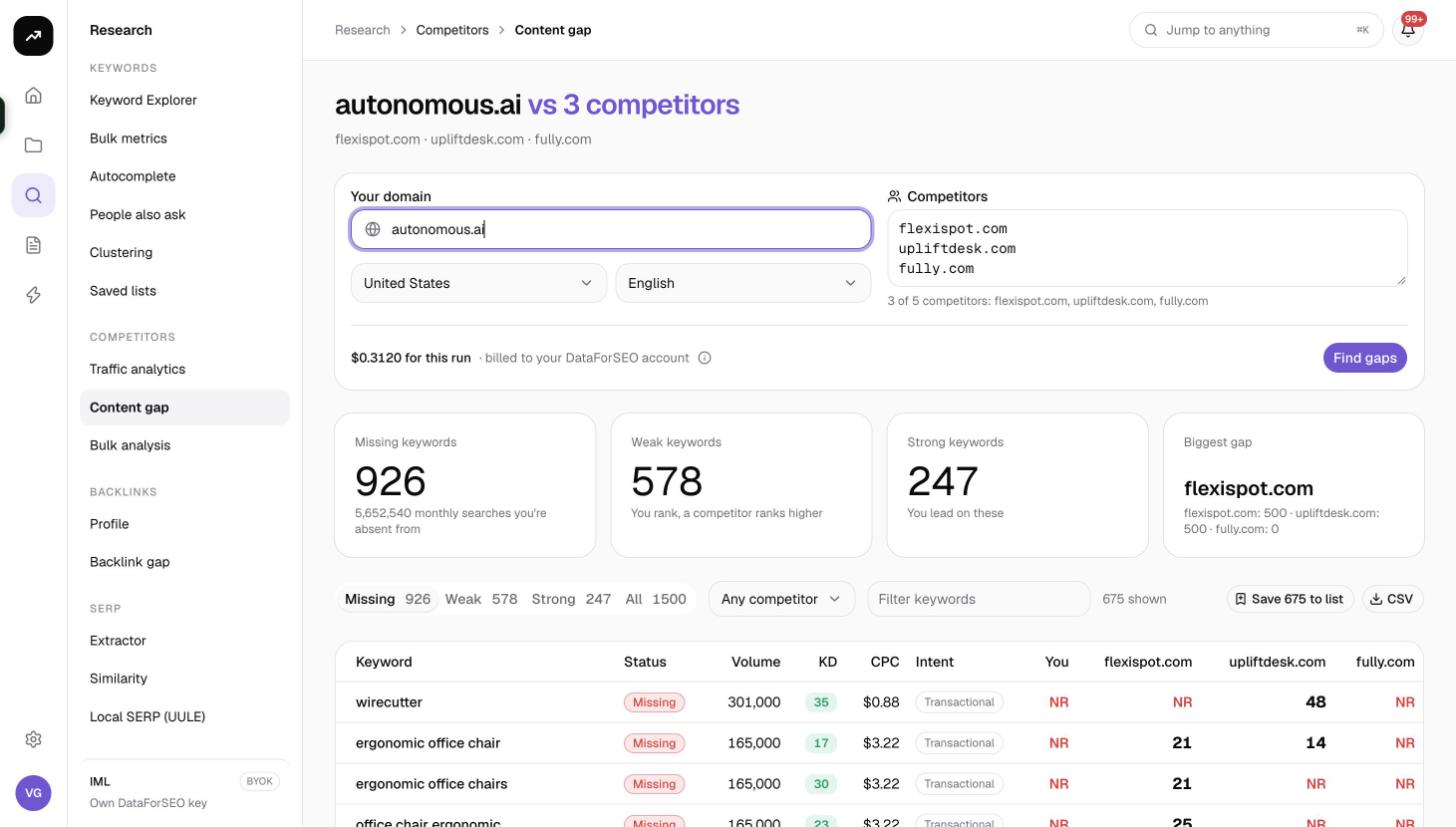
Tiles
- Missing keywords: keywords at least one competitor ranks for and you do not.
- Weak keywords: keywords you rank for, but at least one competitor ranks higher.
- Strong keywords: keywords where you outrank every competitor you entered.
- Biggest gap: the competitor with the most keywords you are missing.
Category tabs
- Missing (default): "Competitors rank, you don't". These are new pages or sections to create.
- Weak: "You rank, but behind a competitor". These are existing pages to improve.
- Strong: "You outrank every competitor here". These are pages to protect and to use as templates.
- All: every keyword in one view.
Next to the tabs, the Any competitor select narrows the table to keywords involving one competitor, and Filter keywords matches text. A counter reads "N shown".
Table
| Column | Meaning |
|---|---|
| Keyword | The keyword |
| Status | A badge: Missing, Weak or Strong |
| Volume | Monthly search volume |
| KD | Keyword difficulty |
| CPC | Average cost per click |
| Intent | Search intent |
| You | Your position, blank for missing keywords |
| One column per competitor | That competitor's position, blank if it does not rank |
Above the table:
- Save to list saves the visible keywords to a keyword list through the "Save to a keyword list" dialog (Existing list or New list, Tags (optional)). Save the Missing tab as a "gap" list and the Weak tab as an "improve" list; duplicates already in the list are skipped.
- CSV downloads the table.
- Pagination offers 25, 50, 100 or 250 rows per page (default 100), with the footer "1–100 of N" and "Page X of Y".
Costs
Cost: 32 credits per competitor, because each competitor needs two comparisons (missing and shared) at 16 credits each. One competitor is 32 credits; five competitors are 160. Gap data is cached for 7 days, so repeating the same domains, market and language within a week is free.
The pre-run figure is an estimate; the charge is the measured cost. The results page shows "N credits for this run".
Tips and gotchas
- The tiles count more than the table shows. The tiles count every keyword returned, but the table is capped at 1,500 rows ordered by volume, and each comparison returns at most 500 rows per competitor. For a very large competitor you see the highest-volume slice, not the long tail.
- Start with Weak. Improving a page that already ranks is usually faster than winning a new keyword, and Weak keywords show exactly which competitor to beat and by how much.
- Sort by intent. Filter the Missing tab for commercial and transactional keywords first; informational gaps are often cheaper to fill but slower to pay off.
- Subdomains and markets matter. Use the same host form for every domain (for example all without "www") and run one market at a time.
- Feed the clustering tool. Save Missing keywords to a list and run them through SERP clustering to see how many pages the gap really needs.