AI Visibility
How often Google AI Overviews and ChatGPT name your brand against competitors, the prompts where you appear, the prompts rivals win, and the pages AI cites.
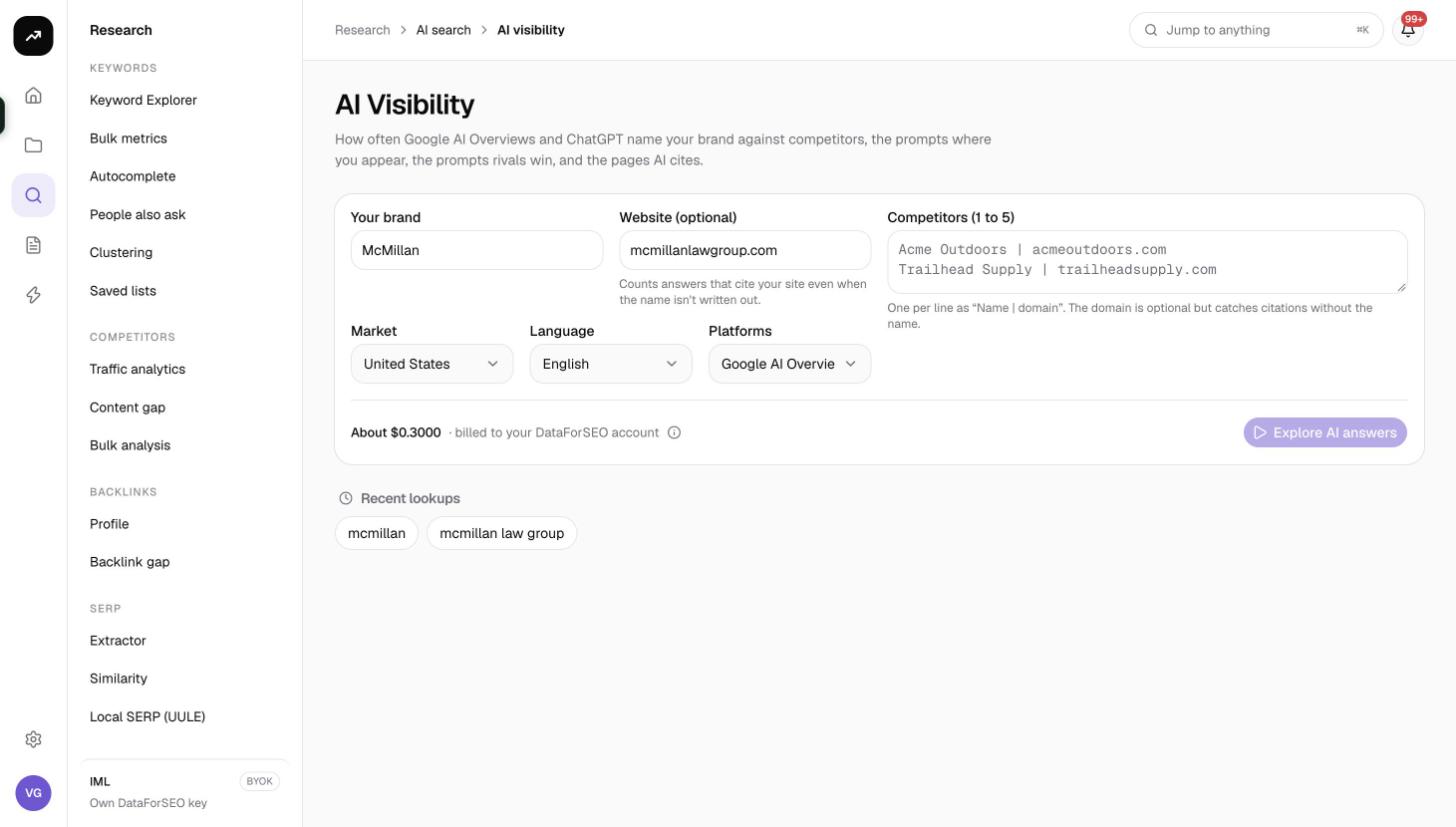
AI Visibility is the research tool for AI search: one run tells you how your brand's share of voice compares with up to five competitors in Google AI Overviews and ChatGPT, lists the real prompts where you are mentioned, lists the prompts where your strongest rival is mentioned and you are not, and shows which domains those answers cite.
What it does
The tool queries a weekly database of real AI answers. For your brand and each competitor it makes three requests:
- A share of voice comparison across all the brands you listed.
- Your prompts: up to 100 prompts where your brand is named, ranked by AI search volume.
- Rival prompts: up to 100 prompts where your strongest competitor is named and your brand is not.
The output is a set of tiles, a share-of-voice chart, a sources-by-brand matrix and two prompt lists you can expand to read the actual answers. It is a one-off research run. For scheduled monitoring of prompts you choose yourself, use an AI search tracker inside a project.
Before you start
- You need a role that can run tools; viewers see Viewers can't run tools.
- Know your brand's name as it is written in text, plus your website domain. The website lets the tool count answers that link to your site even when the name is not written out.
- Collect 1 to 5 competitors with both a name and a domain.
- ChatGPT data is only available for the United States market in English. For any other market or language the tool uses Google AI Overviews only.
- The run costs 72 credits. The button is disabled with This run needs X credits but the organization has Y. if your balance is short.
Step by step
- Open Research, then AI Visibility in the AI search group, or go to
/research/ai-visibility. If you have a project, Your brand and Website are pre-filled from the first one. - Enter Your brand exactly as people write it.
- Enter your Website (optional). The help text explains: "Counts answers that cite your site even when the name isn't written out."
- Set Market (default United States) and Language (default English).
- Choose Platforms: Google AI Overviews and ChatGPT (default), Google AI Overviews only, or ChatGPT only. The ChatGPT options are disabled unless the market is United States and the language is English.
- Fill in Competitors (1 to 5), one per line in the form
Name | domain, for exampleAcme Outdoors | acmeoutdoors.com. - Check the cost line (72 credits), then click Explore AI answers. The page redirects to its permanent
?job=link, shows Reading AI answers…, and fills in when the run is Ready.
Reading the results
Tiles
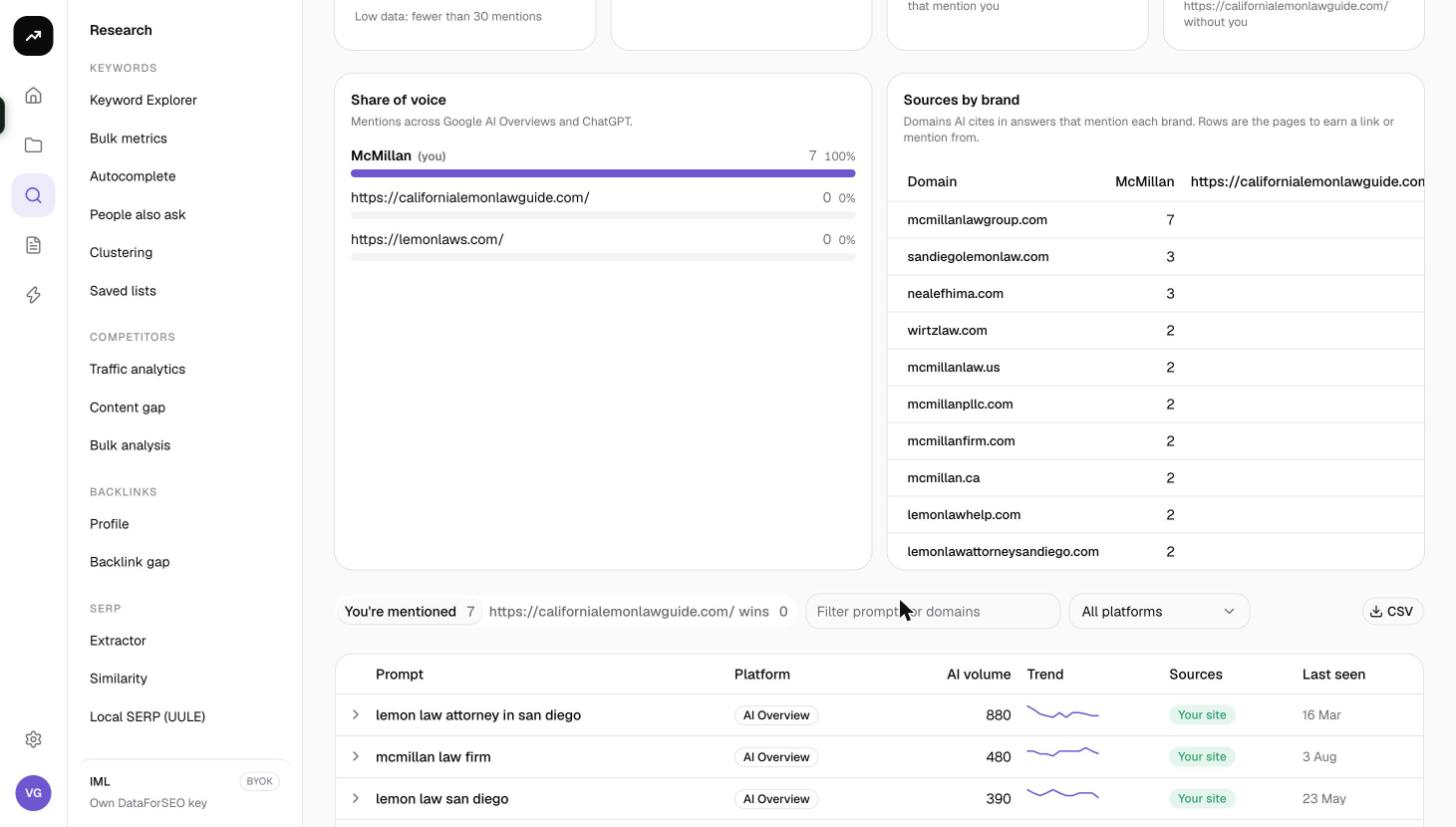
- AI share of voice: your percentage of all brand mentions across the brands compared, with your rank ("#2 of 4"). The tile turns positive when you rank first. If you have fewer than 30 mentions it reads Low data: fewer than 30 mentions, so treat the percentage with caution.
- Mentions: how many AI answers named you, split by platform in the hint (for example "Google AI Overviews 120 · ChatGPT 45"), or "No AI answer names you yet".
- AI search demand: the monthly volume of AI prompts behind the answers that mention you.
- Prompts: two numbers, the count of prompts with you and the count of prompts where your strongest rival appears without you ("With you / Acme without you"). The tile is flagged when the rival's number is higher.
Share of voice card
A horizontal bar per brand showing its share of all mentions, you and each competitor, so the gap is visible at a glance.
Sources by brand card
A matrix of the top 25 cited domains (rows) against the brands (columns), with the number of answers citing each domain while naming each brand. This is where to find the review sites, directories and publishers that AI engines lean on when discussing your category, and whether they mention you or only your rivals.
Prompt lists
Two tabs: You're mentioned N and
- Prompt: the question or query as users ask it.
- Platform: Google AI Overviews or ChatGPT.
- AI volume: the estimated monthly volume of that prompt in AI search.
- Trend: the volume trend.
- Sources: the domains the answer cites, with a Your site badge on your own domain.
- Last seen: when the answer was last recorded.
Click a row to expand it and read the answer text, the full Sources list and Brands named in that answer. Above the table you can type a filter, switch the platform select (All platforms, Google AI Overviews, ChatGPT) and download a CSV.
The footer reminds you: "Showing up to 100 prompts per list, highest AI search volume first. Built from a weekly database of real AI answers."
Costs
Cost: 72 credits per run (three AI mentions requests of 24 credits each). The same brand, competitors, market and platform settings within 7 days are served from the cache for free. On a lifetime license the requests are charged to your own DataForSEO account.
Tips and gotchas
- ChatGPT data is US and English only. Pick another market and the run silently falls back to Google AI Overviews; the Platforms select tells you by disabling the ChatGPT options.
- Each prompt list is capped at 100 prompts, highest AI volume first. If you need long-tail coverage, run again with a narrower brand (a product line written as the brand) rather than expecting more rows.
- The wins tab covers only one competitor, the one with the most mentions. To study another rival, run again with that rival alone in Competitors.
- Enter competitors as
Name | domain. The domain is what links citations to the brand in the Sources by brand matrix; without it the competitor only counts when its name is written out. - A good follow-up is to paste the prompts from the wins tab into an AI search tracker so you can watch whether your content changes start earning mentions.