REST API
Run every research tool and read job results from your own scripts. Endpoints, authentication, the wait parameter, polling, error codes and a worked curl example.
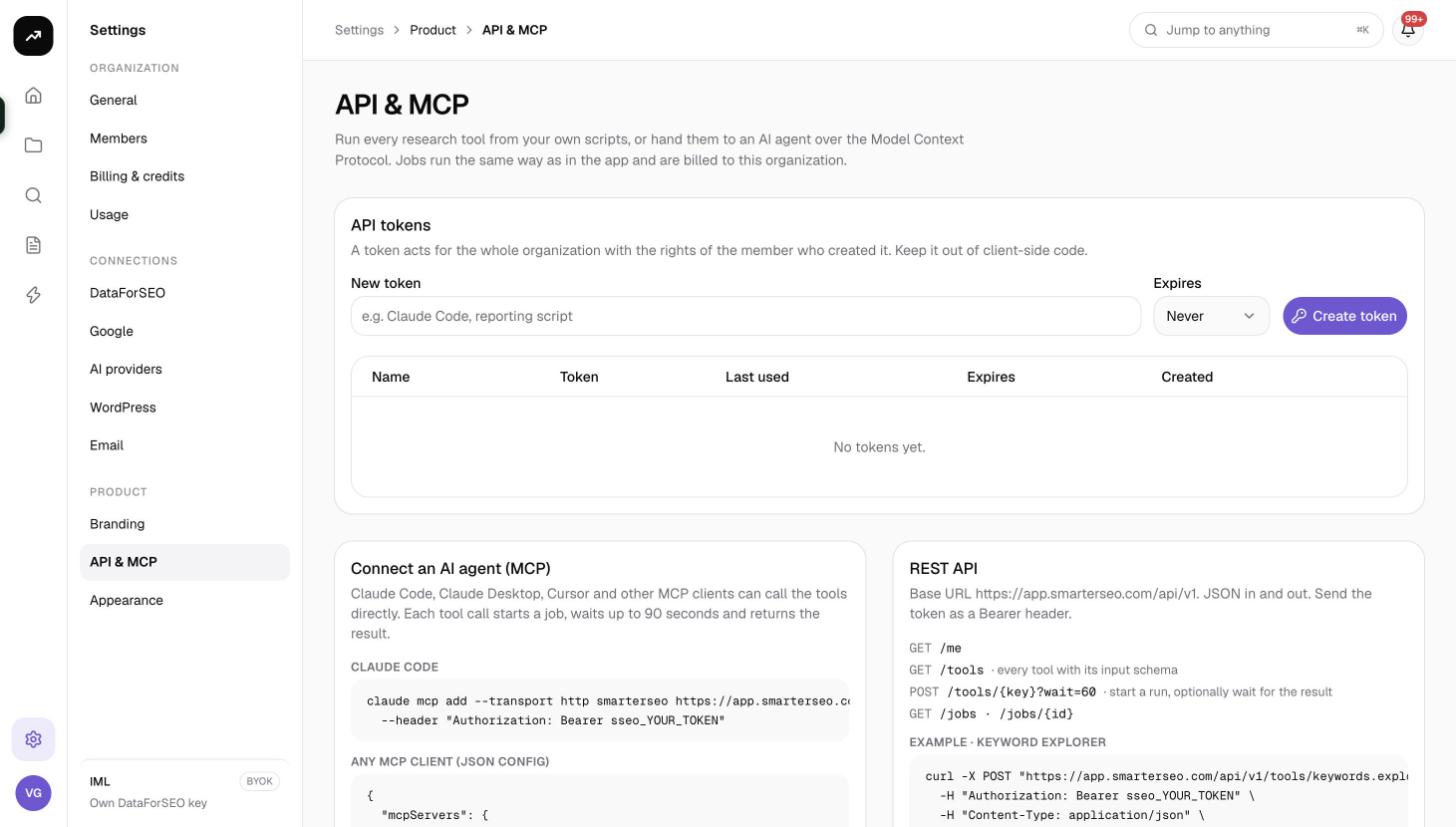
The REST API exposes the same research tools you use under Research in the app, with the same inputs and the same result objects. Start a run with one POST, either wait for the result inline or poll the job, and read back any job the organization has run. Everything is billed to the organization exactly as a run started in the browser would be.
Basics
| Item | Value |
|---|---|
| Base URL | https://app.smarterseo.com/api/v1 |
| Authentication | Authorization: Bearer sseo_YOUR_TOKEN header (or ?api_key=sseo_YOUR_TOKEN) |
| Content type | JSON in, JSON out |
| Rate limits | None at present; be reasonable |
Create a token under Settings › API & MCP; see API tokens. A request without a valid token returns 401 with {"error":{"code":"unauthorized"}}.
Cost: A tool run costs the same credits as the same run in the app. The estimate is checked against the balance before the job is queued; if it does not fit, the API answers
402 insufficient_creditsand nothing is charged. Jobs are listed on the Jobs page like any other run.
Endpoints
| Method | Path | Purpose |
|---|---|---|
GET |
/me |
The organization (id, name, slug, data_mode, credit_balance) and the token's scopes. Use it to confirm a token works. |
GET |
/tools |
Every tool with its key, title, description, group and JSON input_schema. |
POST |
/tools/{key}?wait=N |
Start a run. The body is the tool's input. With wait (0 to 110 seconds) the call blocks and returns the job, 200 if it succeeded in time, 202 otherwise. Without wait it returns 202 immediately with {job, credits_estimate, poll}. |
GET |
/jobs?limit=&status= |
Recent jobs, newest first. limit 1 to 200 (default 50); status one of queued, running, succeeded, failed, cancelled. |
GET |
/jobs/{id} |
One job with status, progress, cost_usd, credits and, once finished, result. |
The tool keys are the 17 listed in MCP server; GET /tools is always the authoritative list, and its input_schema matches the form fields in the app.
Starting a run
Example
curl -X POST "https://app.smarterseo.com/api/v1/tools/keywords.explorer?wait=60" \
  -H "Authorization: Bearer sseo_YOUR_TOKEN" \
  -H "Content-Type: application/json" \
  -d '{"keyword":"standing desk","location_code":2840,"language_code":"en"}'
This runs Keyword Explorer for "standing desk" in the United States (location code 2840) in English and waits up to 60 seconds. A successful response has status 200 and a body like:
{
  "job": {
    "id": "7b1c…",
    "status": "succeeded",
    "tool": "keywords.explorer",
    "credits": 18.42,
    "cost_usd": 0.0921,
    "result": { "…": "the same object the app renders" }
  },
  "credits_estimate": 18.6
}
credits_estimate is what was pre-authorized; job.credits is the measured charge, which can be a little higher or lower.
Waiting vs polling
- Wait (
?wait=60): simplest for scripts. Most keyword, SERP and backlink lookups finish within a minute. The maximum is 110 seconds. If the job is still running when the wait ends you get202with the job in its current state; keep itsidand poll. - Poll (no
wait): returns202at once with{"job":{"id":"…","status":"queued","tool":"…"},"credits_estimate":…,"poll":"/api/v1/jobs/…"}. Fetch thepollpath every few seconds untilstatusissucceeded,failedorcancelled. Use polling for long runs such as large bulk metrics, SERP clustering, deep backlink profiles or AI Visibility, and for anything you start in bulk.
A job's progress field reports the percentage and the current step while it runs.
Reading results
GET /jobs/{id} returns the job with the full result once it has succeeded. The result is the same object the app's report page renders, so field names match what you see on screen (tiles, tables and series). Explore it once in a REPL, then map the fields you need.
GET /jobs lets you reconcile: list the last 200 jobs with ?limit=200, or only failures with ?status=failed.
Errors
| Status | error.code |
Meaning |
|---|---|---|
400 |
invalid_json |
The body is not valid JSON. "The body must be a JSON object." |
400 |
invalid_input |
The body does not match the tool's schema. error.message is the first problem and error.issues lists all of them. |
401 |
unauthorized |
Missing, revoked, expired or malformed token. |
402 |
insufficient_credits |
"This run needs X credits; the organization has Y." Top up or reduce the request. See Running out of credits. |
404 |
unknown_tool |
No tool with that key. "GET /api/v1/tools lists them." |
404 |
not_found |
No job with that id in your organization. |
500 |
report_failed |
The run could not be created; retry, and contact support if it persists. |
Errors are always {"error":{"code":"…","message":"…"}}, with issues added for validation failures.
Tips and gotchas
Tip: Call
GET /toolsonce and cache theinput_schemaof the tools you use. It tells you required fields, enums (for example the backlink mode or the clustering algorithm) and defaults, so you can validate before spending credits.
Note: Repeats of the same request within the data cache window are served from cache and cost nothing, the same as in the app. Deduplicate on your side anyway to keep the Jobs list readable.
- Location codes and language codes follow Google's geo-target list; the app's location picker shows the code next to each place.
- On a lifetime (BYOK) license,
creditsis 0 andcost_usdshows what your own data account was charged. - Jobs started through the API are visible to the whole team in Jobs and Reports, and the resulting reports can be opened in the app.