MCP server
Hand every SmarterSEO research tool to Claude Code, Claude Desktop, Cursor or any MCP client. Setup, how calls wait and return, result limits and the full tool list.
The MCP server lets an AI agent use SmarterSEO as a set of tools. Connect it to Claude Code, Claude Desktop, Cursor or any other client that speaks the Model Context Protocol, and you can ask in plain language for keyword metrics, SERP comparisons, backlink gaps or AI visibility checks; the agent calls the right tool, waits for the job and works with the result.
What it does
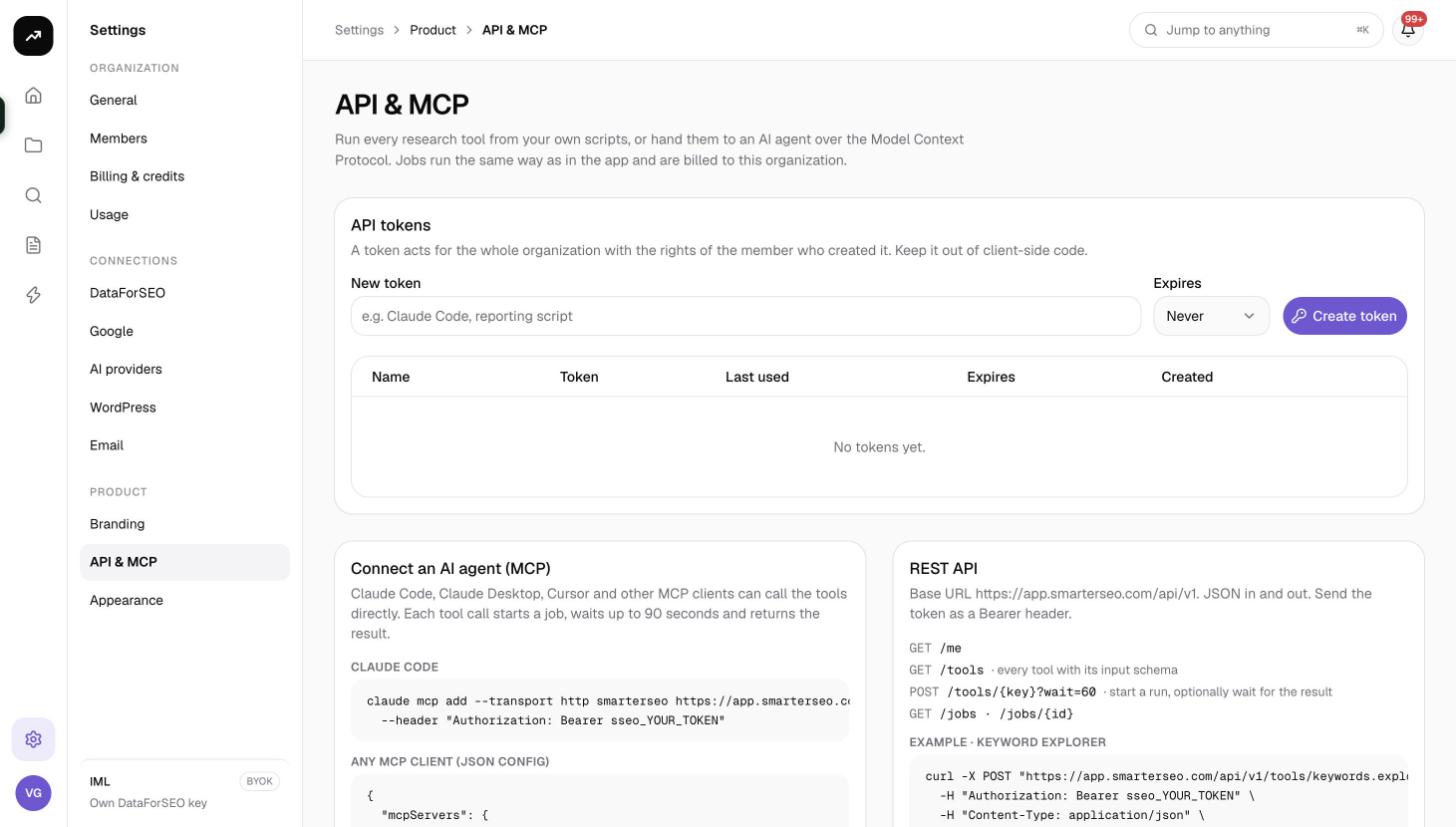
Every tool under Research in the app is exposed as an MCP tool with the same inputs as the app's form. Two extra tools, get_job and list_jobs, read results back. The settings page describes it as: "Claude Code, Claude Desktop, Cursor and other MCP clients can call the tools directly. Each tool call starts a job, waits up to 90 seconds and returns the result."
Cost: A tool call costs exactly what the same run costs in the app and is pre-checked against the balance. Runs show up on the Jobs page with their actual credits. Research tools that are free in the app (Sitemap Extractor, Check mentions) are free here too.
Before you start
- Create an API token under Settings › API & MCP; see API tokens. The MCP server uses Bearer token authentication only (no OAuth flow).
- Your client must support remote MCP servers over HTTP. The server speaks Streamable HTTP with JSON responses (JSON-RPC over POST, protocol version 2025-06-18); it does not stream server-sent events.
Connecting
Server URL: https://app.smarterseo.com/api/mcp
Claude Code
Run once in your terminal:
claude mcp add --transport http smarterseo https://app.smarterseo.com/api/mcp \
  --header "Authorization: Bearer sseo_YOUR_TOKEN"
Then start Claude Code and ask it to "list SmarterSEO tools". It should show the tools below with their inputs.
Any MCP client (JSON config)
Add this to the client's MCP configuration (for Claude Desktop, its claude_desktop_config.json; for Cursor, its MCP settings file):
{
  "mcpServers": {
    "smarterseo": {
      "type": "http",
      "url": "https://app.smarterseo.com/api/mcp",
      "headers": {
        "Authorization": "Bearer sseo_YOUR_TOKEN"
      }
    }
  }
}
Restart the client; the SmarterSEO tools appear alongside its other tools.
How a call behaves
- The agent calls a tool with its inputs. SmarterSEO validates them against the same schema as the app form and checks the credit estimate against the balance.
- A job starts. The call waits up to 90 seconds for it to finish.
- If the job succeeds in time, the call returns
{job_id, status, cost_usd, credits, result}with the full result object, the same one the app renders. - If the job is still running after 90 seconds, the call returns
{job_id, status, progress}and the note "Still running. Call get_job with this job_id in a minute." The agent then callsget_jobwith that id to fetch the result. - If the job fails, the call returns the job id and the error, marked as an error result so the agent knows to stop.
Results are capped at 180,000 characters. A larger result is truncated with the marker "… (truncated; fetch the full result with get_job)"; get_job returns the full payload. Very large results (a 1,000-row bulk metrics table, for example) can still be too big for an agent's context, so ask the agent to work on a subset or summarise.
The server's initialize response carries a short instruction for the agent: tools start jobs and return results; large results are truncated; use get_job for the full payload.
Tools
The server exposes 17 research tools plus get_job and list_jobs. Every description ends with "Runs as a background job; the call waits up to 90 seconds and returns the result, or a job id to fetch later with get_job."
| Tool | What it does |
|---|---|
keywords.explorer |
Keyword Explorer: volume, difficulty, intent and the live top 10 for one keyword, plus suggestions, related keywords and questions. |
keywords.bulk-metrics |
Bulk keyword metrics: volume, CPC and competition for up to 1,000 keywords from Google Ads data. |
keywords.autocomplete |
Bulk Autocomplete: Google's suggestions for seed keywords, expanded with letters a to z and question and comparison modifiers. |
keywords.paa |
People Also Ask: every question Google shows for your keywords, opened level by level, with the answering page. |
keywords.clustering |
SERP Clustering: group up to 1,000 keywords by shared ranking URLs so each cluster is one page to write. |
competitors.traffic |
Traffic Analytics: estimated organic traffic, ranking keywords, top pages and competitors for any domain. |
competitors.content-gap |
Content Gap: keywords competitors rank for and you do not, plus where they outrank you, across up to five domains. |
competitors.bulk-analysis |
Bulk Analysis: rank, backlinks, referring domains, spam score and organic traffic for up to 1,000 domains. |
backlinks.profile |
Backlink Analytics: a domain's backlink profile with referring domains, anchors, link types, geography and history. |
backlinks.gap |
Backlink Gap: referring domains linking to competitors but not to you, ranked by authority and overlap. |
serp.extractor |
SERP Extractor: live Google results for up to 100 keywords with positions, SERP features and the most frequent domains. |
serp.similarity |
SERP Similarity: compare the top 10 for up to 50 keywords and group the ones Google treats as one topic. |
serp.local |
Local SERP: Google as seen from a coordinate or named location, with local pack, organic results and features. |
serp.ads |
Ads Vision: advertisers bidding on your keywords from a year of stored SERPs and today's live results, with headlines, volume and CPC. |
ai.visibility |
AI Visibility: how often AI Overviews and ChatGPT name your brand against competitors, winning and losing prompts, and cited pages. |
technical.sitemap |
Sitemap Extractor (free): every URL in a site's XML or HTML sitemap with last-modified dates and a folder breakdown. |
technical.mentions |
Check mentions (free): for each keyword and page, whether the keyword appears in title, meta description, H1, other headings and body. |
get_job |
Get job result: status and result of a job started by any tool. Input job_id. |
list_jobs |
List recent jobs: recent jobs in the organization, newest first. Optional limit (1 to 200) and status (queued, running, succeeded, failed, cancelled). |
Project features such as rank trackers, local grids, Search Console views and content tools are not exposed over MCP.
Example prompts
- "Use SmarterSEO to get volume and difficulty for these 40 keywords, then cluster them and suggest one page per cluster."
- "Run a content gap between example.com and its top three competitors in the US and list the 20 keywords with the highest volume where we do not rank."
- "Extract the sitemap of example.com and check whether each blog URL mentions its target keyword in the title."
- "Check job 7b1c… and summarise the result."
Tips and gotchas
Tip: Tell the agent the market up front ("US, English") so it fills
location_codeandlanguage_codecorrectly instead of guessing. The schema the agent sees is the same as the app form, so the field names will be familiar.
Warning: The agent can spend credits on your behalf, and a loop of retries can spend them quickly. Keep an eye on the Jobs page the first few times, and consider a token that expires for experiments.
- Repeated identical requests inside the cache window are free, as in the app.
- If the client reports "Unauthorized", the token is wrong, revoked or expired; check Last used on the tokens table.
GETto the server URL answers 405 with a reminder that it speaks JSON-RPC over POST only; that is expected when you open it in a browser.