White-label branding
Put your brand name, logo, accent colour, website and footer line on every shared report link, and hide the SmarterSEO credit. Included on every plan.
Branding controls what clients see when they open a shared report link: your name, your logo and your colour instead of SmarterSEO's. It is set once for the whole organisation, applies to every share link including the ones you created earlier, and is included on every plan.
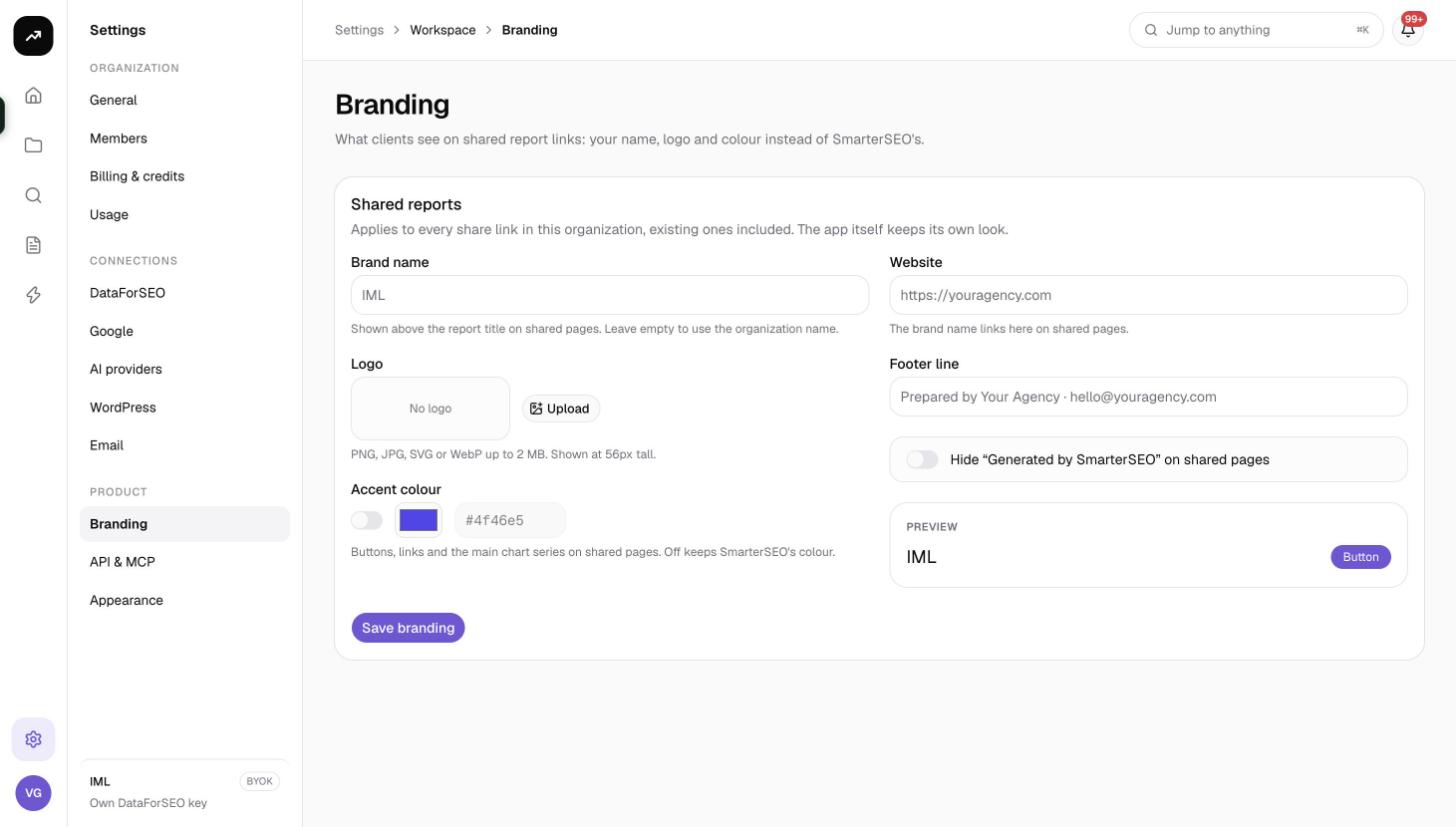
What it does
The page summarises it as "What clients see on shared report links: your name, logo and colour instead of SmarterSEO's." The Shared reports card adds the scope: "Applies to every share link in this organization, existing ones included. The app itself keeps its own look." In other words, branding changes the public pages at /share/{token} and nothing else; your team keeps the normal SmarterSEO interface.
Cost: Free. White label is included on every plan, including Free and the lifetime license.
Before you start
- Only Owners and Admins can change branding.
- Have a logo ready as PNG, JPG, SVG or WebP under 2 MB. It is displayed 56 pixels tall, so a wide, horizontal logo works best; a square icon will look small.
- Know your brand's hex colour.
The fields
| Field | What it does | Where it shows on the shared page |
|---|---|---|
| Brand name | Defaults to the organisation name. "Shown above the report title on shared pages." | Header, as text next to the logo. Linked to your website if one is set. |
| Logo | Upload, Replace or Remove. "PNG, JPG, SVG or WebP up to 2 MB. Shown at 56px tall." | Header, left of the brand name. |
| Accent colour | A toggle plus a hex value. "Buttons, links and the main chart series on shared pages. Off keeps SmarterSEO's colour." | The Print button, links and the primary line or bars in every chart. |
| Website | "The brand name links here on shared pages." Must start with http:// or https://. | The brand name becomes a link. |
| Footer line | Free text, for example "Prepared by Your Agency · hello@youragency.com". | Footer of every shared page. |
| Hide "Generated by SmarterSEO" on shared pages | A toggle. | Removes the SmarterSEO credit from the footer. With a footer line set, only your line remains; without one, the footer shows only the expiry sentence. |
Setting it up
- Open Settings › Branding.
- Enter the Brand name if it should differ from the organisation name.
- Click Upload under Logo and choose the file.
- Turn on Accent colour and paste the hex value.
- Enter the Website and the Footer line.
- Decide whether to turn on Hide "Generated by SmarterSEO" on shared pages.
- Check the live preview on the page; it renders a sample header and footer as a client would see them.
- Click Save branding.
Every existing share link reflects the change the next time it is opened.
What is not branded
- Emails. Alert digests, automation emails and invitations are sent from SmarterSEO's address with SmarterSEO's look. If you need fully branded emails, use an automation's Webhook action to post the data into your own email system; see Automations.
- The app itself. Teammates and clients who sign in see the standard interface.
- The domain. Shared links live on app.smarterseo.com. A custom domain for share pages is not available from the settings at the moment.
Tips and gotchas
Tip: Pick an accent colour with enough contrast against white; it is used for the main chart series as well as buttons, and a very light colour makes the clicks or position line hard to read.
Note: Branding is per organisation. An agency running several brands can create a separate organisation per brand (each with its own projects and billing) if the branding must differ; see Workspaces and organizations.
- An SVG logo stays sharp on high-density screens and prints well through the Print button on shared pages.
- Removing the logo falls back to text only; the brand name is always shown.