SERP clustering
Group up to 1,000 keywords by the URLs they share in Google's results, so each cluster is one page to write.
SERP clustering answers the question "which of these keywords can one page rank for?" Instead of guessing from wording, it looks at what Google actually ranks. Keywords whose results share enough of the same URLs are grouped into a cluster; each cluster is a page you should write, with a primary keyword and the variants it should also target.
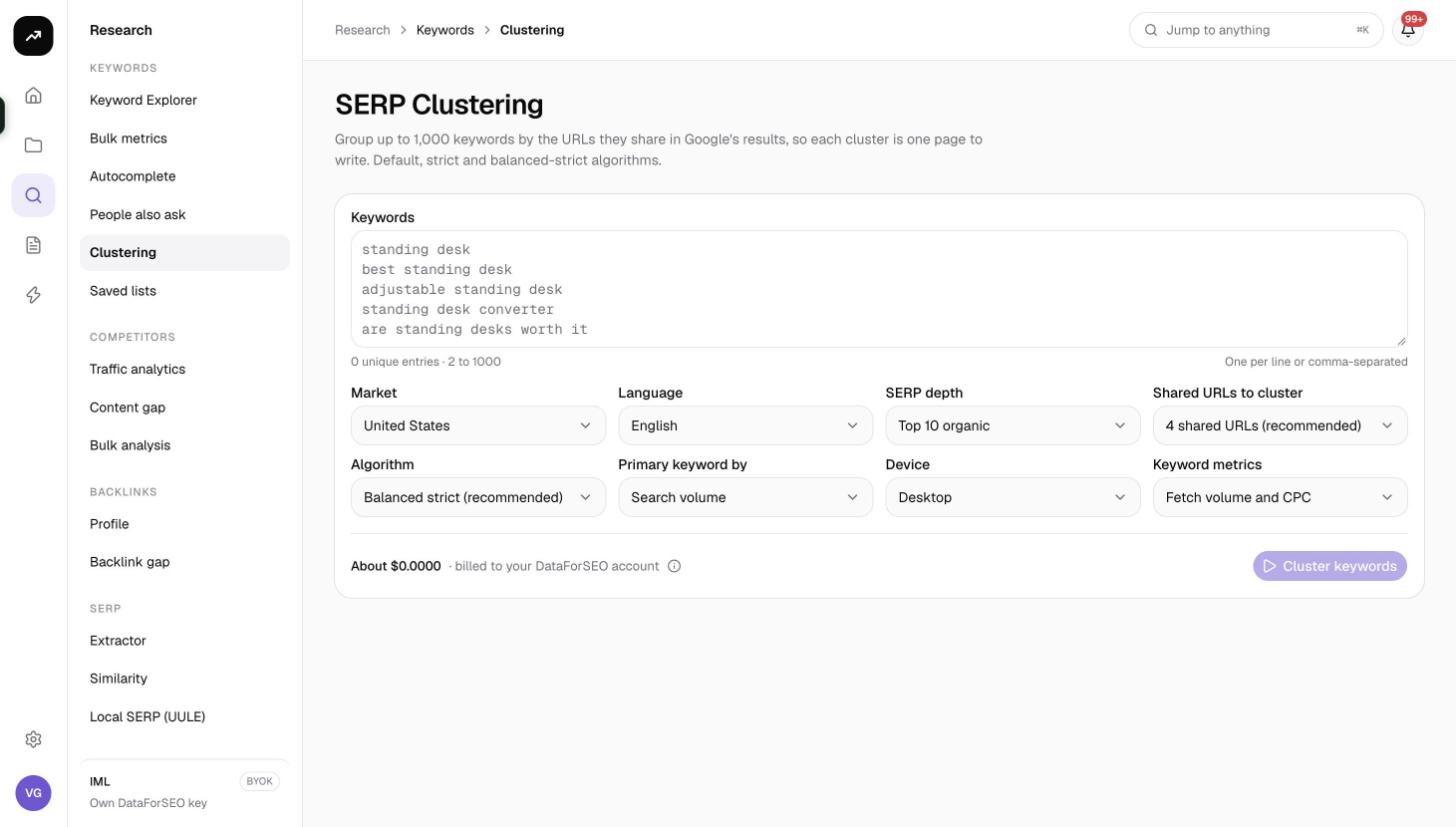
What it does
You paste a keyword list, choose how strict the grouping should be, and click Cluster keywords. SmarterSEO fetches a live Google result page for every keyword, eight at a time, then compares the ranking pages between keywords. Where two keywords share at least the number of URLs you set, they belong together. Optionally it also fetches Google Ads volume and CPC for every keyword so it can pick the primary keyword of each cluster and show its total volume.
Large lists take a few minutes because every keyword needs its own search; the status badge shows progress.
Before you start
- 2 to 1,000 keywords, one per line.
- Market, Language and Device. Market defaults to United States, Language to English and Device to Desktop (or Mobile). Results differ by device, so cluster on the device your audience uses.
- SERP depth: Top 10 organic (default) or Top 20 organic. Deeper comparisons find more overlap but cost more.
- Shared URLs to cluster: 2 to 8, default 4 shared URLs (recommended). Lower values make bigger, looser clusters; higher values make smaller, tighter ones.
- Algorithm:
| Option | How members are chosen |
|---|---|
| Balanced strict (recommended) | A keyword must share enough URLs with the primary keyword and with most of the members already in the cluster: all of them while the cluster has up to 5 members, 80 percent up to 10 members, 60 percent beyond that |
| Default: match the primary keyword | A keyword joins a cluster if it shares enough URLs with the primary keyword, regardless of the other members |
| Strict: match every member | A keyword joins only if it shares enough URLs with the primary keyword and with every keyword already in the cluster |
- Primary keyword by: Search volume (default) or CPC. This decides which keyword leads each cluster.
- Keyword metrics: Fetch volume and CPC (default) or Skip (keeps input order). Skipping keeps your list order instead of ranking by volume.
- Role and credits. Viewers cannot run tools. The button is disabled if the estimate is more than the balance.
Step by step
- Open Research, then SERP clustering in the Keywords group (
/research/keywords/clustering). - Paste the keywords into the Keywords box. A saved list's CSV is a good source.
- Set Market, Language and Device.
- Choose the SERP depth, the Shared URLs to cluster threshold and the Algorithm. The recommended defaults (Top 10, 4 shared URLs, Balanced strict) suit most lists.
- Decide how the Primary keyword should be chosen and whether to fetch Keyword metrics.
- Check the cost estimate and click Cluster keywords.
- On the results page the badge reads Collecting with a label such as "120 of 400 SERPs" until all searches are done, then Ready. The page updates automatically.
Reading the results
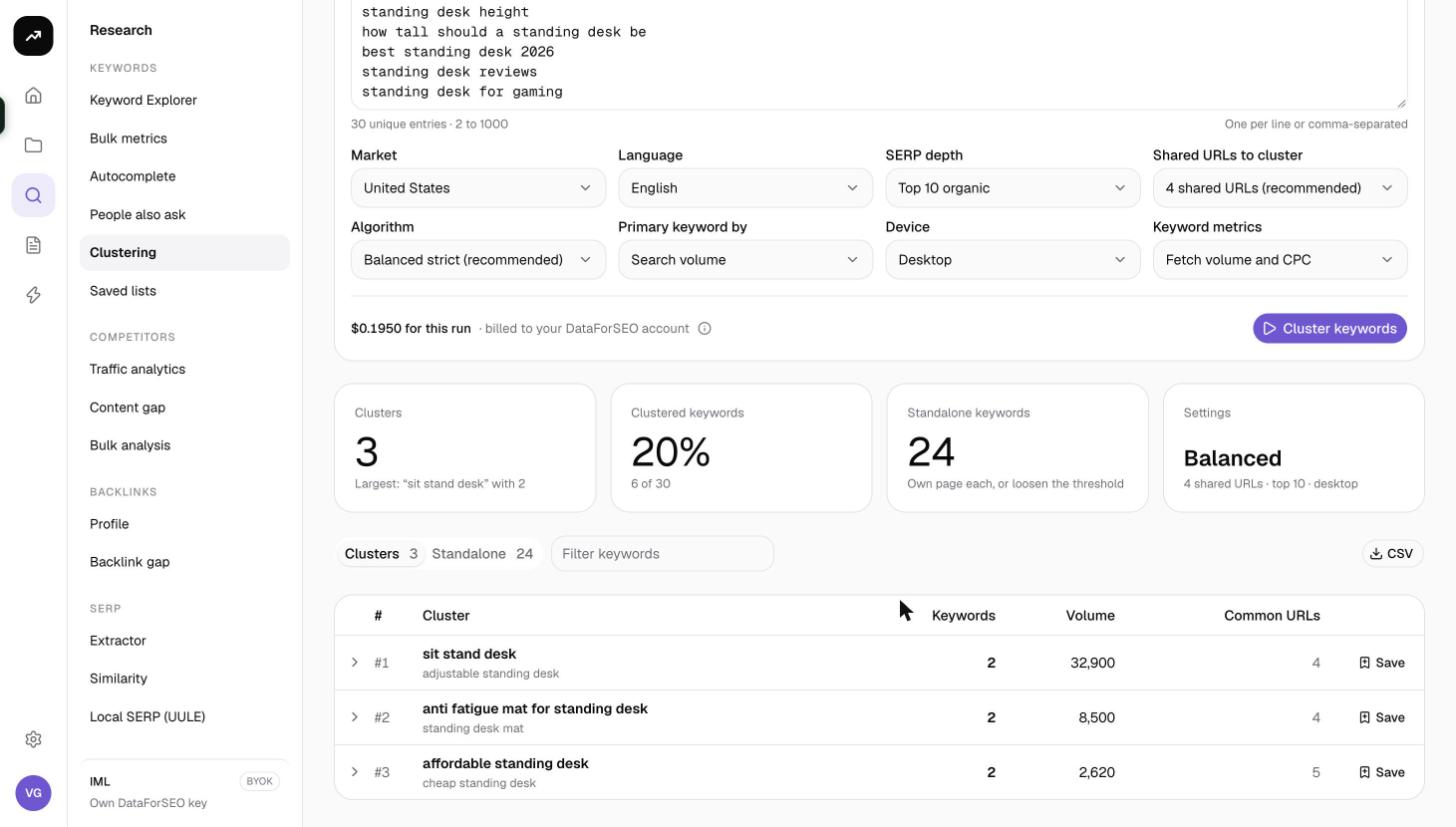
Tiles
- Clusters: how many groups were formed.
- Clustered keywords: how many keywords landed in a cluster, with the percentage of your list.
- Standalone keywords: keywords that did not share enough URLs with any other keyword.
- Settings: a summary of the depth, threshold and algorithm used, so you can tell runs apart.
Clusters tab
The tab title shows the count, for example Clusters 42. Each row is one cluster:
| Column | Meaning |
|---|---|
| # | Cluster number |
| Cluster | The primary keyword in bold with its member keywords listed underneath |
| Keywords | How many keywords the cluster contains |
| Volume | Combined monthly search volume of all members (when metrics were fetched) |
| Common URLs | How many ranking URLs every keyword in the cluster shares |
| Save | Saves that cluster's keywords to a keyword list |
Expand a row to see each member with its Volume, CPC and Shared X of Y, meaning how many of the primary keyword's ranking URLs this member also has. Below the members is URLs ranking for every keyword in the cluster, the pages that prove the grouping; these are your SERP competitors for the page you will write.
Standalone tab
Keywords that could not be grouped. They may deserve their own page, or they may be too broad or too ambiguous. Save standalone puts them into a keyword list for later.
Filters and export
- Filter keywords searches primary and member keywords.
- The per-row Save button and Save standalone use the standard "Save to a keyword list" dialog with Existing list or New list and optional Tags. Keywords already in the list are skipped.
- CSV downloads one row per keyword with the columns cluster, primary, keyword, volume, cpc, shared_with_primary and shared_urls.
- Tables paginate with 25, 50, 100 or 250 rows per page (default 100).
Costs
Cost: 1 credit per keyword at Top 10 organic or 2.4 credits per keyword at Top 20 organic, plus 20 credits per run for keyword metrics. A 500-keyword list at Top 10 is about 520 credits. Search results are cached for 24 hours and keyword metrics for 30 days, so re-running the same list with a different threshold or algorithm the same day costs almost nothing.
The 20-credit metrics line is included in the estimate even when Skip is selected. As with every tool, the figure before the run is an estimate and the charge is the measured cost.
Tips and gotchas
- Why Top 10 fetches 20 results. Google's first page often holds only about five organic results once features are counted, so the tool collects twice the chosen depth to have enough pages to compare. That is why Top 10 is billed at the 20-result rate.
- Tune the threshold, not the list. If clusters look too broad, raise Shared URLs to cluster to 5 or 6 and re-run; within 24 hours the searches are free. If almost everything is standalone, lower it to 3.
- Redirect links are handled. Google sometimes returns the same page as different redirect links across searches. The tool compares pages by a stable identity so the clustering is not fooled.
- At least two searches must succeed or the run fails. If a handful fail, those keywords end up standalone.
- Clean the input first. Run the list through Bulk keyword metrics and drop zero-volume keywords; fewer searches means fewer credits.
- Clusters make good tracker groups. Save each cluster with a tag and use the list when you create a rank tracker.