Bulk Autocomplete
Google's own autocomplete suggestions for a list of seed keywords, expanded with letters a to z and question and comparison modifiers.
Bulk Autocomplete mines Google's search box. For each seed keyword you enter, it asks Google what it would suggest, then repeats the question with every letter of the alphabet and with question and comparison words added. The result is a long tail of real phrases people type, including many that never show up in volume databases.
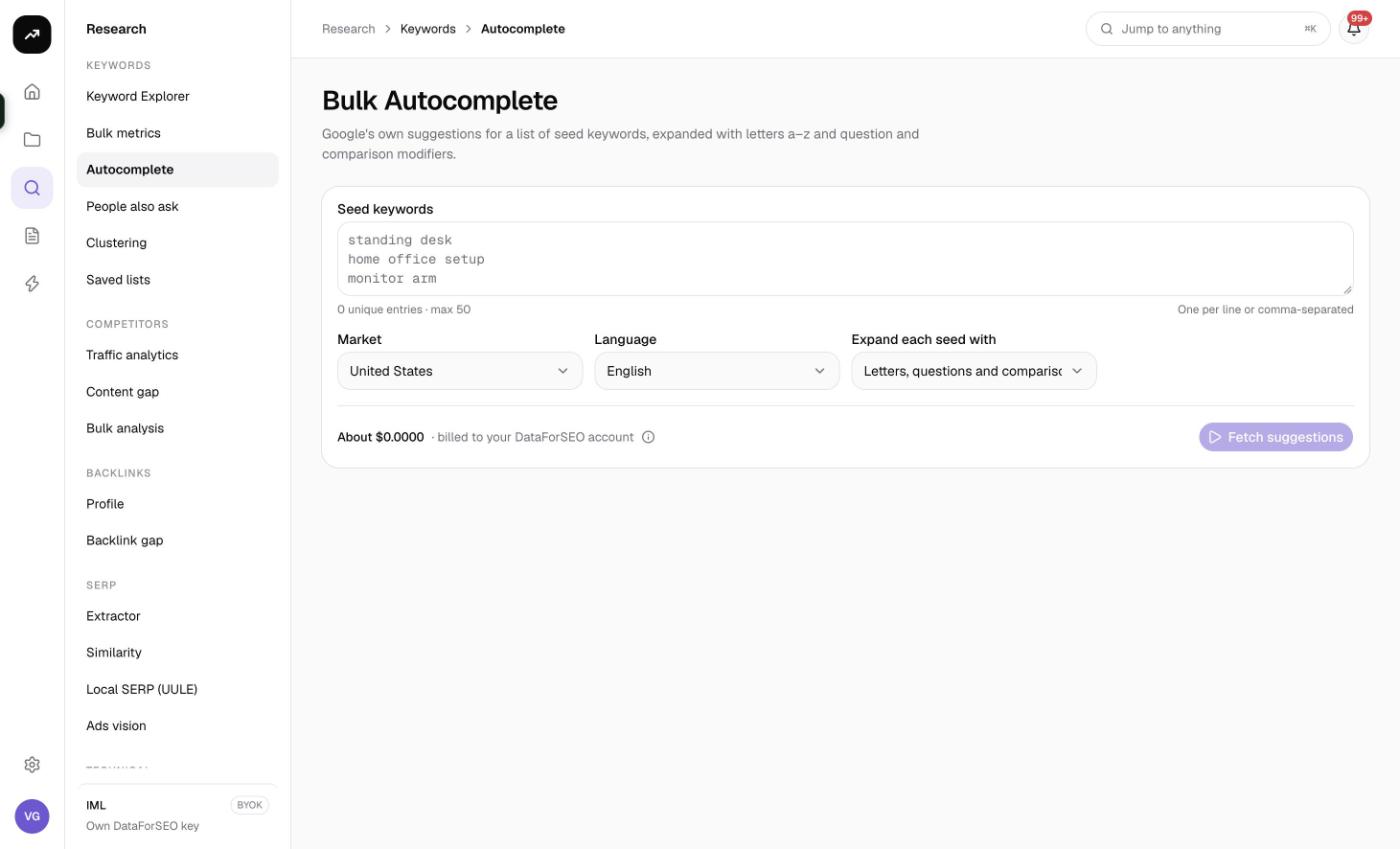
What it does
Autocomplete suggestions are what Google shows as you type. SmarterSEO fetches them live for each seed and, depending on the expansion you choose, for a set of modified versions of the seed:
- Letters a–z (after and before): "seed a", "seed b" … and "a seed", "b seed" …, 52 extra lookups per seed
- Questions and comparisons: 13 question words placed before the seed (how, what, why, when, where, which, who, can, does, is, are, should, will) and 13 comparison and commercial words placed after it (vs, or, for, with, without, near me, best, cheap, free, alternative, review, cost, price), 26 extra lookups per seed
The suggestions from all lookups are merged, de-duplicated and scored for relevance, and questions are flagged so you can pull them out separately.
Before you start
- 1 to 50 seed keywords, each up to 80 characters. Enter them one per line or separated by commas; the counter reads "N unique entries · max 50".
- Market and Language default to United States and English. Autocomplete is very sensitive to language, so set it to match the market.
- Expansion mode determines how many lookups run per seed:
| Option | Lookups per seed |
|---|---|
| Exact seed only | 1 |
| Letters a–z (after and before) | 53 |
| Questions and comparisons | 27 |
| Letters, questions and comparisons (default) | 79 |
- Run time. Lookups run five at a time. Fifty seeds at full expansion is 3,950 lookups and takes a while; the status badge shows progress while it runs.
- Role and credits. Viewers cannot run tools, and the button is disabled if the estimate exceeds your balance.
Step by step
- Open Research, then Bulk Autocomplete in the Keywords group (
/research/keywords/autocomplete). - Enter your seeds in the Seed keywords box.
- Choose the Market and Language.
- Under Expand each seed with, pick the expansion. Start with Exact seed only or Questions and comparisons if you are testing a topic; use the full expansion once you know the seeds are good.
- Check the cost estimate and click Fetch suggestions.
- On the results page the badge moves from Queued to Collecting with a percentage and a count of lookups done, then to Ready. The page updates automatically.
Without a result, the page shows up to eight Recent searches chips; click one to reopen or re-run that search.
Reading the results
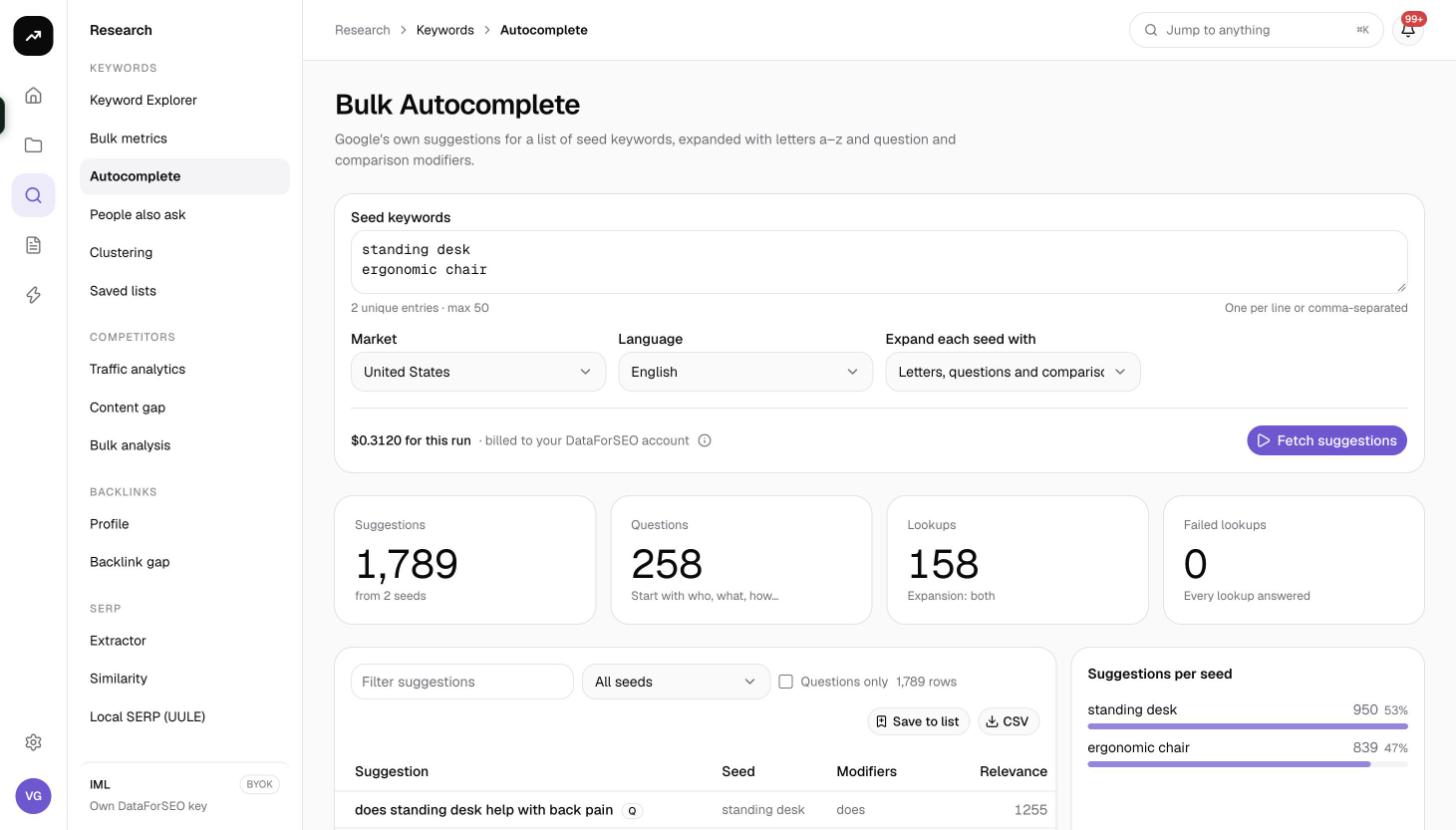
Tiles
- Suggestions: unique phrases found across all seeds and modifiers.
- Questions: how many of those are questions.
- Lookups: how many autocomplete requests the run made, with "N served from cache" underneath when some were free.
- Failed lookups: requests that returned an error. A lookup that simply had no suggestions is not counted as a failure.
Suggestions table
| Column | Meaning |
|---|---|
| Suggestion | The phrase Google suggested. Questions carry a Q badge |
| Seed | Which of your seeds produced it |
| Modifiers | The letter or word that was added to the seed to surface it, if any |
| Relevance | A score for how closely the suggestion matches the seed; higher is closer |
Filters and actions above the table:
- Filter suggestions matches text inside the suggestion.
- The seed select (default All seeds) restricts the table to one seed.
- Questions only keeps just the rows with the Q badge.
- Save to list saves the visible suggestions to a new or existing keyword list, with optional tags. Autocomplete phrases do not come with volume, so save them and then run Refresh metrics on the list to attach Google Ads data.
- CSV downloads the columns keyword, seeds, modifiers, relevance and question.
- Pagination offers 25, 50, 100 or 250 rows per page (default 100).
The side panel Suggestions per seed is a bar list showing which seeds were the most productive, which helps you decide where to dig deeper on the next run.
Costs
Cost: 0.5 credits per lookup. Per seed that is 0.5 for the exact seed, 26.5 for letters, 13.5 for questions and comparisons, or 39.5 for the full expansion. Autocomplete answers are cached for 7 days, so repeating a seed within a week is free and lookups that hit the cache are reported in the Lookups tile.
The estimate shown before you run assumes nothing is cached; the real charge is the measured cost of the lookups that actually ran.
Tips and gotchas
- Seeds should be short. Two or three words leave room for Google to append. Long seeds produce few suggestions.
- No volume yet. Autocomplete tells you what people type, not how often. Save to a list and refresh metrics, or run promising phrases through Keyword Explorer.
- Empty is not failed. Some letter combinations have no suggestions; those show nothing and are not counted under Failed lookups.
- Questions are gold for FAQ sections. Use Questions only and save the result as its own list, tagged "questions", to feed content outlines.
- Cache helps iteration. Re-running the same seeds with a wider expansion within 7 days only pays for the new modifiers.