Bulk keyword metrics
Search volume, CPC, competition and top-of-page bids for up to 1,000 keywords in one run, straight from Google Ads data.
Bulk keyword metrics takes a list you already have, from a client brief, a Search Console export or a brainstorm, and attaches Google Ads search volume, cost per click, competition and bid estimates to every keyword. It is the quickest way to size a keyword list before you track it, cluster it or write for it.
What it does
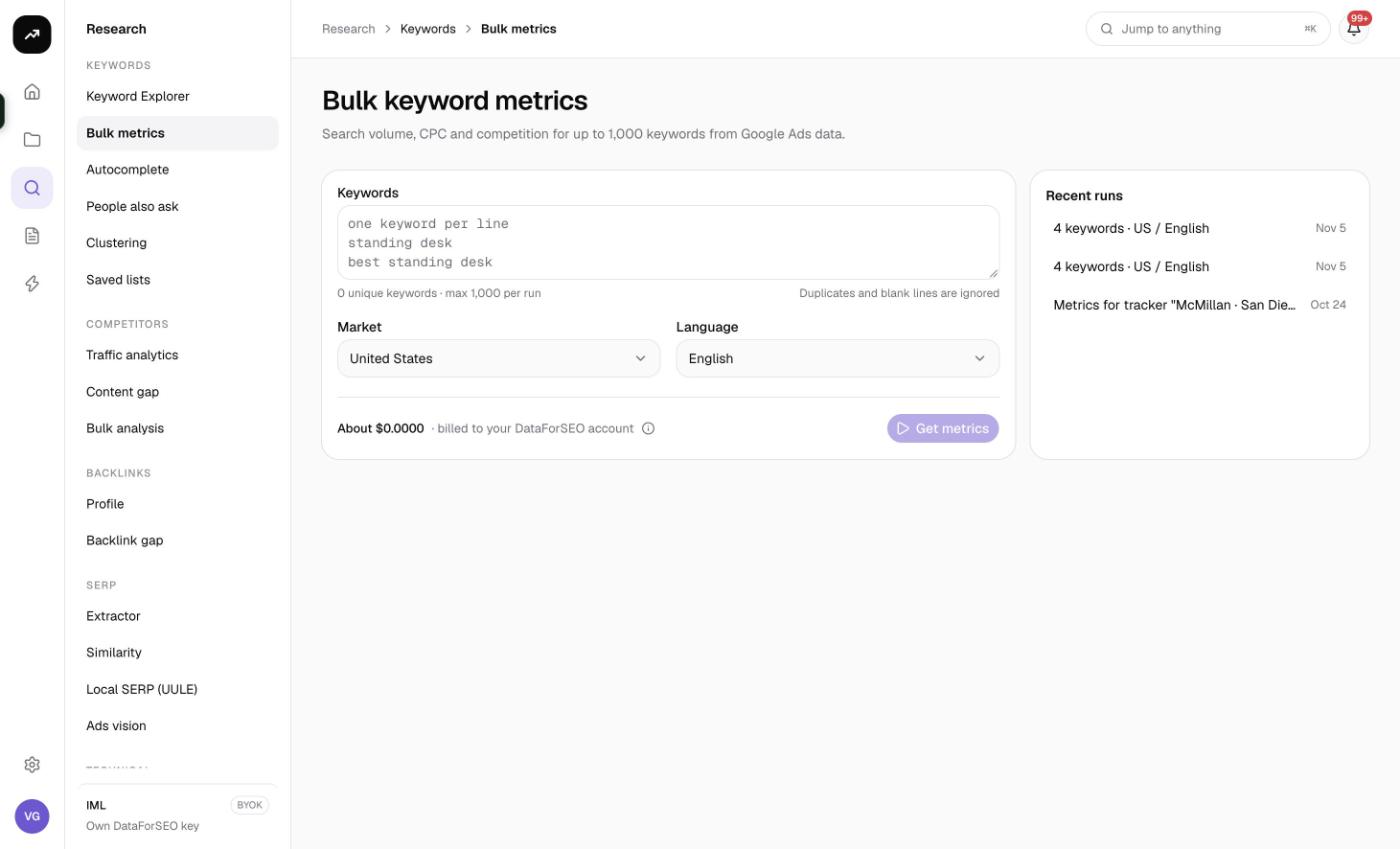
You paste up to 1,000 keywords, choose a market and language and click Get metrics. SmarterSEO sends the list to the Google Ads search volume dataset in a single request per 1,000 keywords and returns a table with volume, CPC, competition, top-of-page bid range and a 12-month trend for each keyword. Keywords that Google Ads has no data for in that market are still listed, but greyed out, so you can see what was dropped.
The same lookup powers Refresh metrics on Saved lists and on rank trackers, so the numbers you see here match the ones written back to your lists and trackers.
Before you start
- Up to 1,000 keywords per run, one per line. The counter under the box reads "N unique keywords · max 1,000 per run". Duplicates and blank lines are ignored, and each keyword can be at most 80 characters.
- Market and Language default to United States and English. Pick the market first, then set the language yourself; the form does not switch it for you.
- Role. Viewers cannot run tools. You need an editor or admin role.
- Credits. If the estimate exceeds your balance the button is disabled and the form says "This run needs X credits but the organization has Y. Top up under Billing & credits."
Step by step
- Go to Research and open Bulk keyword metrics in the Keywords group (
/research/keywords/bulk). - Paste your keywords into the Keywords box, one per line. Watch the counter to confirm the unique count and that you are under 1,000.
- Choose the Market and Language.
- Check the cost line and click Get metrics.
- The results page opens with a status badge. The lookup is a single request, so it normally completes in seconds and the page updates on its own.
- When the badge reads Ready, the Results card fills in. The page URL is the permanent link to this run.
The side card Recent runs lists your last eight runs. Until you have run anything it reads "Your runs appear here. Results stay available and repeats within 30 days cost nothing." Click a recent run to reopen its results.
Reading the results
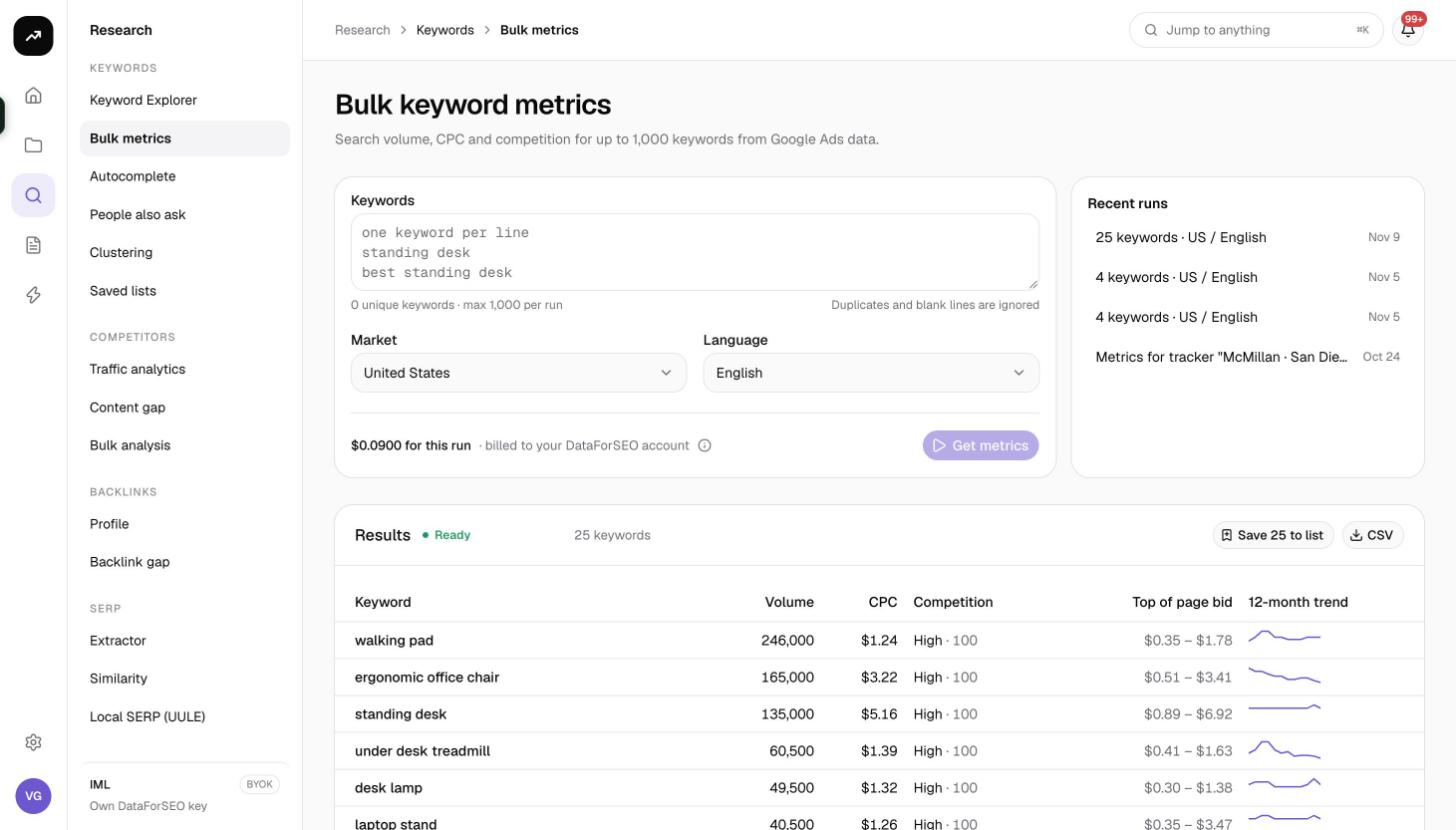
The Results card header shows the status badge and a summary such as "250 keywords · 12 without data". The table has these columns:
| Column | Meaning |
|---|---|
| Keyword | The keyword as you entered it |
| Volume | Average monthly searches in the chosen market and language |
| CPC | Average cost per click in Google Ads |
| Competition | Advertiser competition shown as Low, Medium or High, followed by the underlying competition index |
| Top of page bid | The low and high bid estimates for appearing at the top of the page, shown as a range |
| 12-month trend | A sparkline of monthly search volume over the past year |
Rows with no data are greyed out and carry the note "No Google Ads data for this market". This usually means the keyword is very low volume, is grouped under a close variant, or is not searched in that market.
Above the table:
- Save to list opens the "Save to a keyword list" dialog. Pick Existing list or New list, optionally add Tags, and confirm. Keywords already in the list are skipped, and the confirmation offers an Open list link.
- CSV downloads the table with the columns keyword, volume, cpc, competition, competition_index, low_bid and high_bid.
- Pagination is client side: choose 25, 50, 100 or 250 rows per page (default 100). The footer shows "1–100 of N" and "Page X of Y".
Bulk metrics does not return keyword difficulty or intent. If you need those, save the keywords to a list and run the ones that matter through Keyword Explorer, or use SERP clustering to group them first.
Costs
Cost: 20 credits per request of up to 1,000 keywords, whether you send 10 keywords or 1,000. Keyword data is cached for 30 days, so re-running the same list in the same market and language is free.
Because the price is per request rather than per keyword, it is cheaper to combine small lists into one run than to run them separately. The cost line shows an estimate; the real charge is the measured data cost, and the results page shows "N credits for this run" afterwards.
Tips and gotchas
- Fill the request. Ten keywords cost the same as a thousand. If you have several small lists for the same market, paste them together and split them later with tags in a saved list.
- One market per run. Volume differs by country, so run the list once per market you care about rather than mixing markets in one list.
- Zero is not an error. Grey rows mean Google Ads has nothing for that keyword in that market. Try a broader phrasing, or check the keyword in Keyword Explorer, which uses a different dataset for suggestions.
- Refresh metrics uses this tool. When you click Refresh metrics on a saved list, the same request runs for up to 1,000 keywords and the new volume and CPC are written back to the list. It costs the same 20 credits.
- Trend sparklines show relative change. Compare the shape, not the height, between keywords with very different volumes.