Sitemap Extractor
Every URL in a site's XML or HTML sitemap, following sitemap indexes, with last-modified dates, a folder breakdown and a CSV export. Free.
Sitemap Extractor lists every URL a site declares in its sitemaps. Give it a bare domain or a sitemap URL and it follows sitemap indexes, handles gzip, reads last-modified dates and shows how the URLs are spread across folders and across time. It works on your own sites and on competitors' sites alike.
What it does
SmarterSEO fetches the sitemap directly from the site (nothing is sent to a paid provider). A bare domain is resolved through robots.txt first, then /sitemap.xml. Sitemap indexes are followed up to 200 files and 50,000 URLs. If the URL you give is an HTML page (a human-readable sitemap), every same-host link on that page is collected instead. Duplicate URLs are removed and each sitemap file has a 20 second timeout.
Before you start
- You need a role that can run tools; viewers see Viewers can't run tools.
- Decide what to start from: a bare domain (
example.com) to let the tool discover the sitemaps, or a specific sitemap URL (https://example.com/sitemap.xml, a sitemap index, or a.xml.gzfile) to go straight to it. - Very large sites stop at 50,000 URLs. If you need a particular section, point the tool at that section's child sitemap instead of the index.
Step by step
- Open Research, then Sitemap Extractor in the Technical group (
/research/technical/sitemap). - Type the domain or sitemap URL into the URL bar ("example.com or https://example.com/sitemap.xml"). Your last 8 lookups appear as chips below the bar for one-click reruns.
- The cost line reads Free: "The sitemap is fetched directly from the site. A bare domain is resolved through robots.txt, then /sitemap.xml. Sitemap indexes are followed up to 200 files and 50,000 URLs."
- Click Extract URLs. The page redirects to its permanent
?job=link and fills in when the run is Ready.
Reading the results
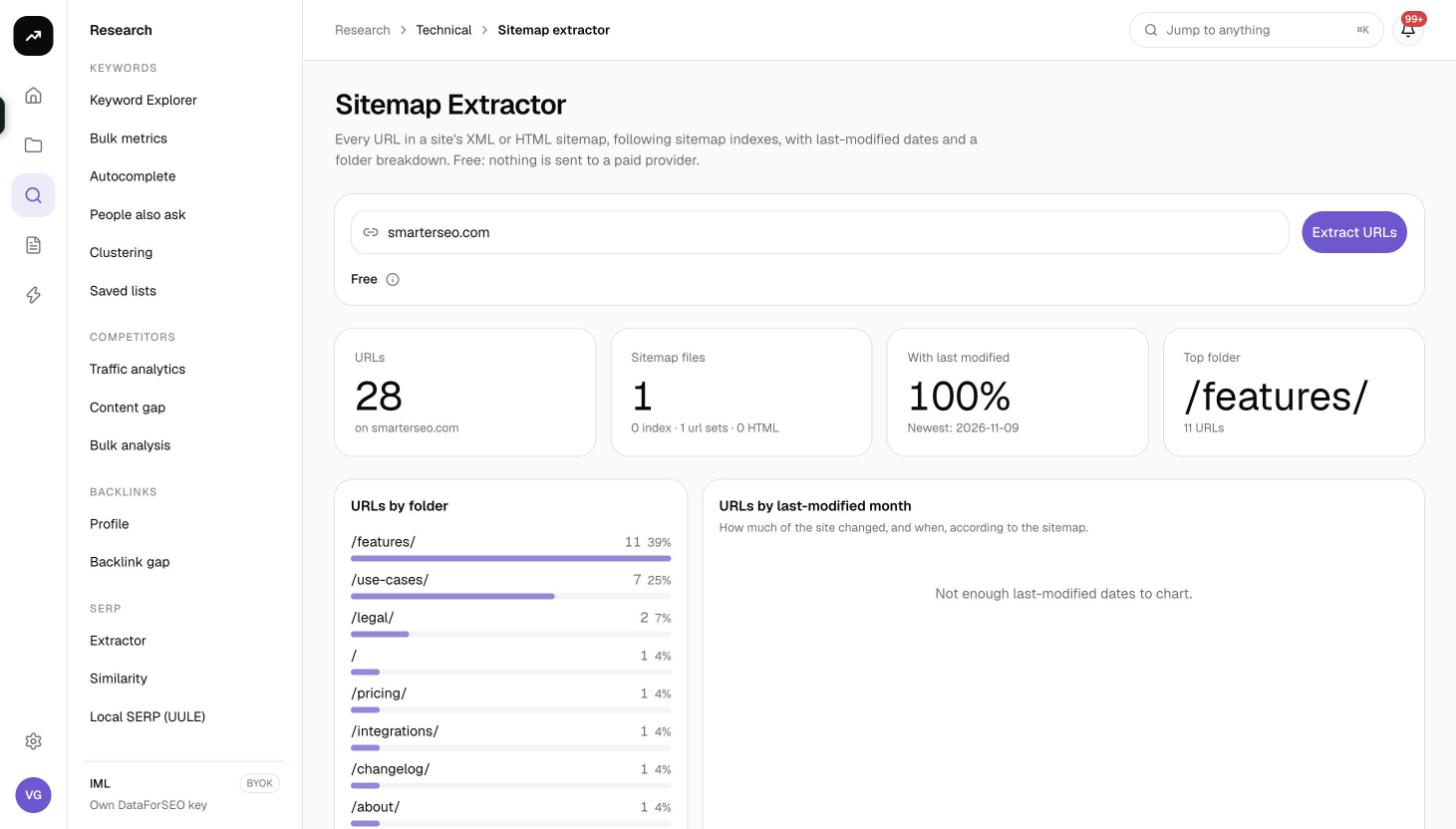
Tiles
- URLs: the total unique URLs found, or Stopped at the 50,000 URL cap when the site is larger.
- Sitemap files: how many files were read, with a breakdown of index files, URL sets, HTML pages and failed files.
- With last modified: the share of URLs carrying a lastmod date, and the newest date found ("Newest: …").
- Top folder: the first-level path segment holding the most URLs.
Charts
- URLs by folder: a bar chart of the top 12 first-level folders. A quick read of the site's architecture and where its content weight sits.
- URLs by last-modified month: the last 24 months of lastmod dates, "How much of the site changed, and when, according to the sitemap." When too few URLs carry a date it reads "Not enough last-modified dates to chart."
Filters and actions
- Filter URLs matches any part of the URL.
- All folders narrows to one first-level folder.
- All sitemap files narrows to the URLs from one sitemap file.
- Analyse domains opens Bulk analysis pre-filled from the results, useful when the sitemap belongs to a competitor.
- CSV downloads the visible rows with the columns url, lastmod, sitemap.
URL table
Columns URL, Last modified and Sitemap (the file the URL came from). Any sitemap file that could not be fetched or parsed is listed with an error badge so you know which part of the index is broken. Pagination is client-side with 25, 50, 100 (default) or 250 rows per page.
Costs
Cost: free on every plan. The sitemap is read directly from the site.
Tips and gotchas
- Sitemaps are declarations, not reality. Combine this list with Indexing data or an IndexNow Bing check to see which declared URLs are actually indexed.
- A sitemap that returns HTML (for example an error page) is treated as an HTML sitemap and yields that page's links. If the count looks wrong, check the Sitemap files tile for HTML files and failed files.
- Lastmod dates that are all identical or all today usually mean the CMS stamps them on generation; the month chart will show one spike and should not be read as a real publishing history.
- The 50,000 URL cap applies per run. Run the tool on each child sitemap of a large index to get everything.
- Use the CSV as the page list for Check mentions or a Metadata audit.
- When you add a site to IndexNow, the same sitemaps are pulled on a schedule and new URLs are submitted automatically.