Indexing
Inspect pages through Google's URL Inspection API, see which are indexed, not indexed or at risk, track coverage changes over time and review your sitemaps.
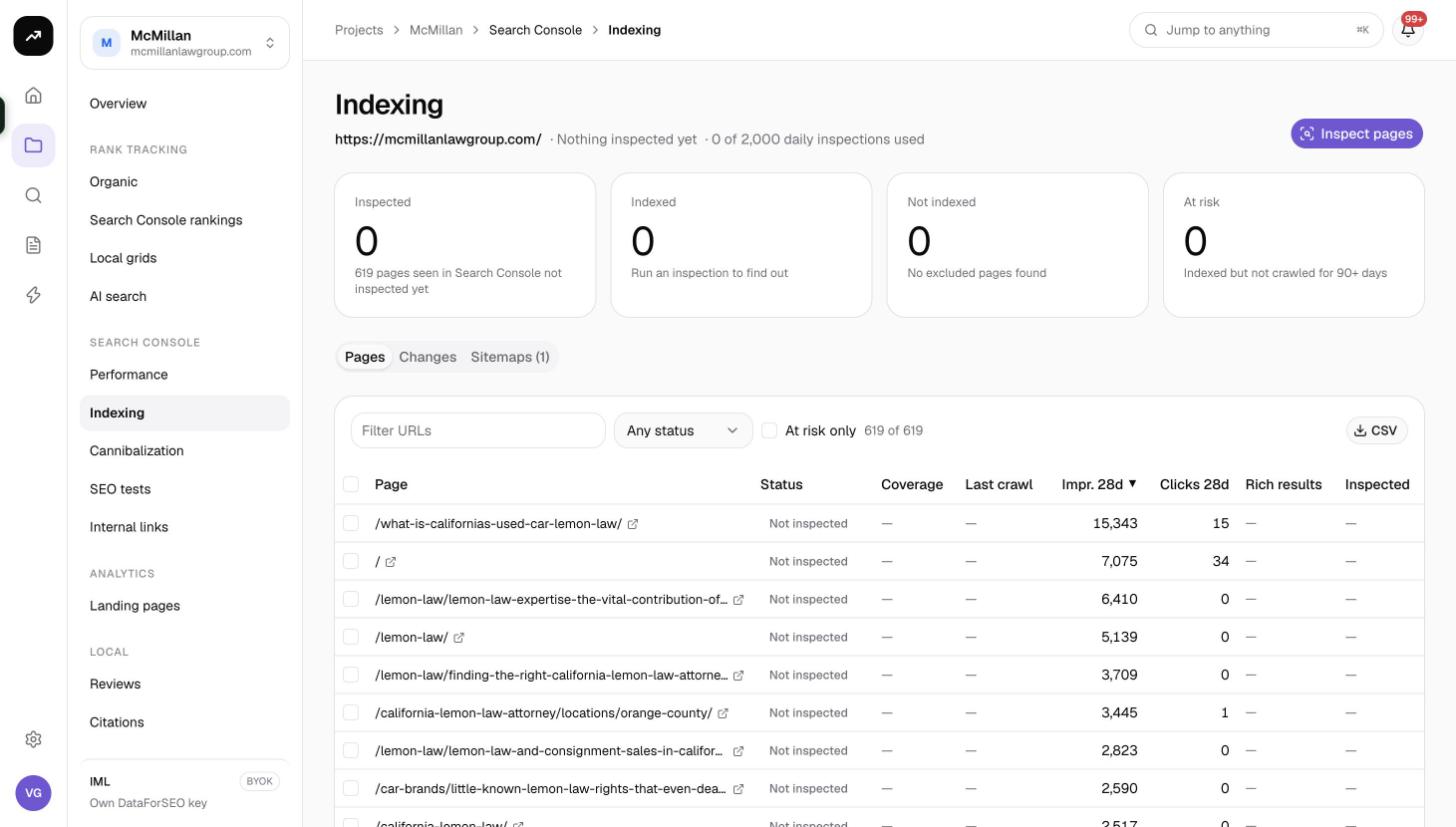
Indexing runs Google's URL Inspection on your pages in bulk and keeps the results, so you can see which pages are indexed, which are not, which have not been crawled in months, and how each page's state has changed since the last inspection. It also lists the sitemaps Google knows about for the property.
What it does
Each inspection asks Google the same question the URL Inspection tool in Search Console answers: is this URL indexed, what is its coverage state, when was it last crawled, and does it have rich results? SmarterSEO records the answer per page and per inspection date, which is what makes the Changes tab and the At risk tile possible.
Cost: Free. Inspections use Google's quota, not your credits. Google allows 2,000 inspections per property per day, resetting at midnight UTC.
Before you start
- The project needs a linked Search Console property; see Connect Google Search Console and GA4.
- Pasted URLs must belong to the property. A URL-prefix property can only inspect URLs under that prefix; a domain property can inspect anything on the domain.
- Only owners, admins and members can start inspections. Viewers can see the results.
Running an inspection
- Open the project's Search Console › Indexing page. The header shows the property picker and Last inspection ….
- Click Inspect pages.
- Choose a source:
- Pages seen in Search Console: every page that had impressions in the last 28 days. Pages that have never been inspected go first, then the ones with the oldest inspection, so repeated runs rotate through the whole site.
- Sitemap URLs: the URLs listed in the property's sitemaps.
- Paste URLs: your own list, one per line. They must belong to the property.
- Set Inspect up to. The maximum is whatever is left of today's 2,000-per-property quota.
- Click Start inspection.
Google answers roughly one page per second, so 1,000 pages take about 17 minutes. Long runs continue in follow-up jobs; you can leave the page. When the run finishes, the person who started it receives an email if Reports and inspections is on in their notification preferences (see Email notifications).
You can also select rows in the Pages tab and click Inspect now (for pages never inspected) or Re-inspect now to refresh just those.
Reading the results
Tiles
| Tile | Meaning |
|---|---|
| Inspected | Pages that have at least one inspection result. |
| Indexed | Pages whose latest inspection says they are in Google's index. |
| Not indexed | Pages whose latest inspection says they are not. |
| At risk | "Indexed but not crawled for 90+ days." These are indexed today but Google has not visited them in three months, which often precedes a drop out of the index. |
A coverage bar under the tiles shows the indexed share at a glance.
Pages tab
Filters at the top of the table:
- Status: Indexed, Not indexed, Unknown, Not inspected.
- Coverage state: Google's own coverage label, for example "Submitted and indexed" or "Crawled - currently not indexed".
- At risk only: show only the pages counted in the At risk tile.
Columns:
| Column | Meaning |
|---|---|
| Page | The URL. |
| Status | Indexed, Not indexed or Unknown from the latest inspection; Not inspected if there is none. |
| Coverage | Google's coverage state string. |
| Last crawl | When Googlebot last fetched the page, according to Google. |
| Impr. 28d | Impressions in the last 28 days from the synced Search Console data. |
| Clicks 28d | Clicks in the last 28 days. |
| Rich results | Whether Google detected valid rich result markup. |
| Inspected | When the latest inspection ran. |
Select rows with the checkboxes to use Inspect now / Re-inspect now, and use CSV to export the filtered table.
Changes tab
Every time a new inspection returns a different state for a page, a row is added here: When, Page, From, To and Now (the current state, which may have changed again since). The tab shows the latest 200 changes. This is the place to check after a site migration or a template change.
Sitemaps tab
Lists the sitemaps Google holds for the property: Sitemap, Type (sitemap or sitemap index), Submitted URLs, Indexed, Last read by Google, Errors and Warnings.
Note: Google no longer reports indexed counts for most properties, so the Indexed column is often empty. That is a limitation on Google's side, not a sync problem.
Tips and gotchas
Tip: Run Pages seen in Search Console on a schedule of your own, for example once a week. Because the source always picks never-inspected and oldest-inspected pages first, each run keeps the picture fresh without re-inspecting the same URLs.
Warning: The 2,000-a-day quota is per property, shared with anything else that uses the URL Inspection API for that property, including other tools and other SmarterSEO projects linked to the same property. Inspect up to already deducts what SmarterSEO has used today.
- Pages that have impressions but return Not indexed are usually recently dropped; check the Changes tab for the date.
- For a crawl of your own pages' internal links rather than Google's view of them, see Internal links.
- To push new or changed URLs to Bing and other IndexNow engines, use IndexNow. Google does not take part in IndexNow.