Pages, distribution and the SERP archive
Read the Pages, Distribution and Competitors tabs, pick a comparison period and open the exact Google result page for any keyword on any day.
Beyond the keyword table, an organic rank tracker breaks results down by ranking page, by position band and by every domain that shares your result pages, and it keeps a compact copy of each result page so you can see what Google actually showed on a given day.
The period selector
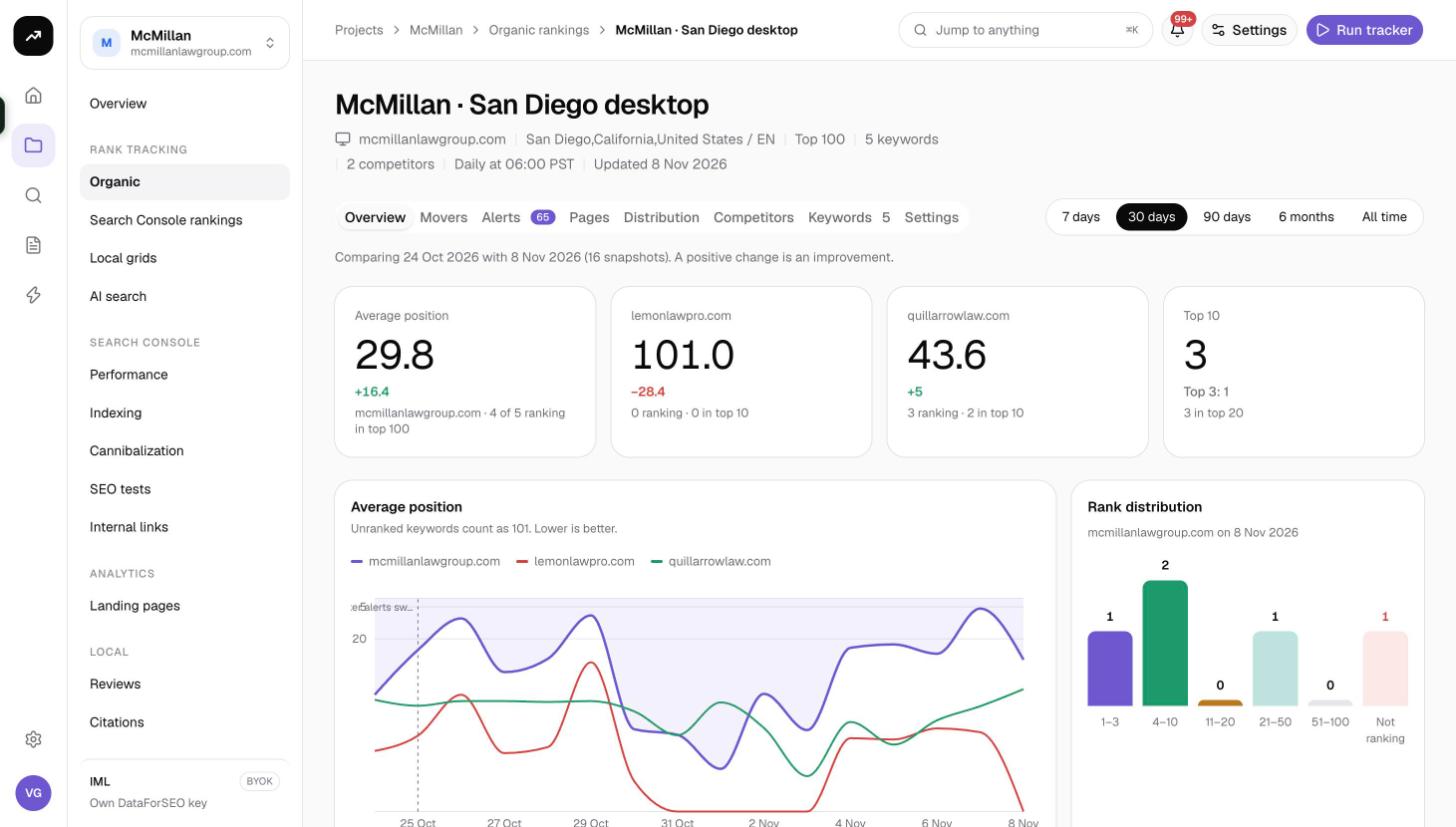
The period selector at the top of the tracker applies to every tab: 7 days, 30 days (default), 90 days, 6 months and All time. The tracker picks the first and the last snapshot inside that range and compares them. A line under the selector confirms the dates: "Comparing {from} with {to} (N snapshots). A positive change is an improvement." With a single snapshot it reads "One snapshot so far…" and the change columns stay empty.
Because the comparison uses snapshots rather than calendar days, a weekly tracker viewed over 30 days compares roughly four runs apart, while a daily one compares a month of daily checks.
Pages tab
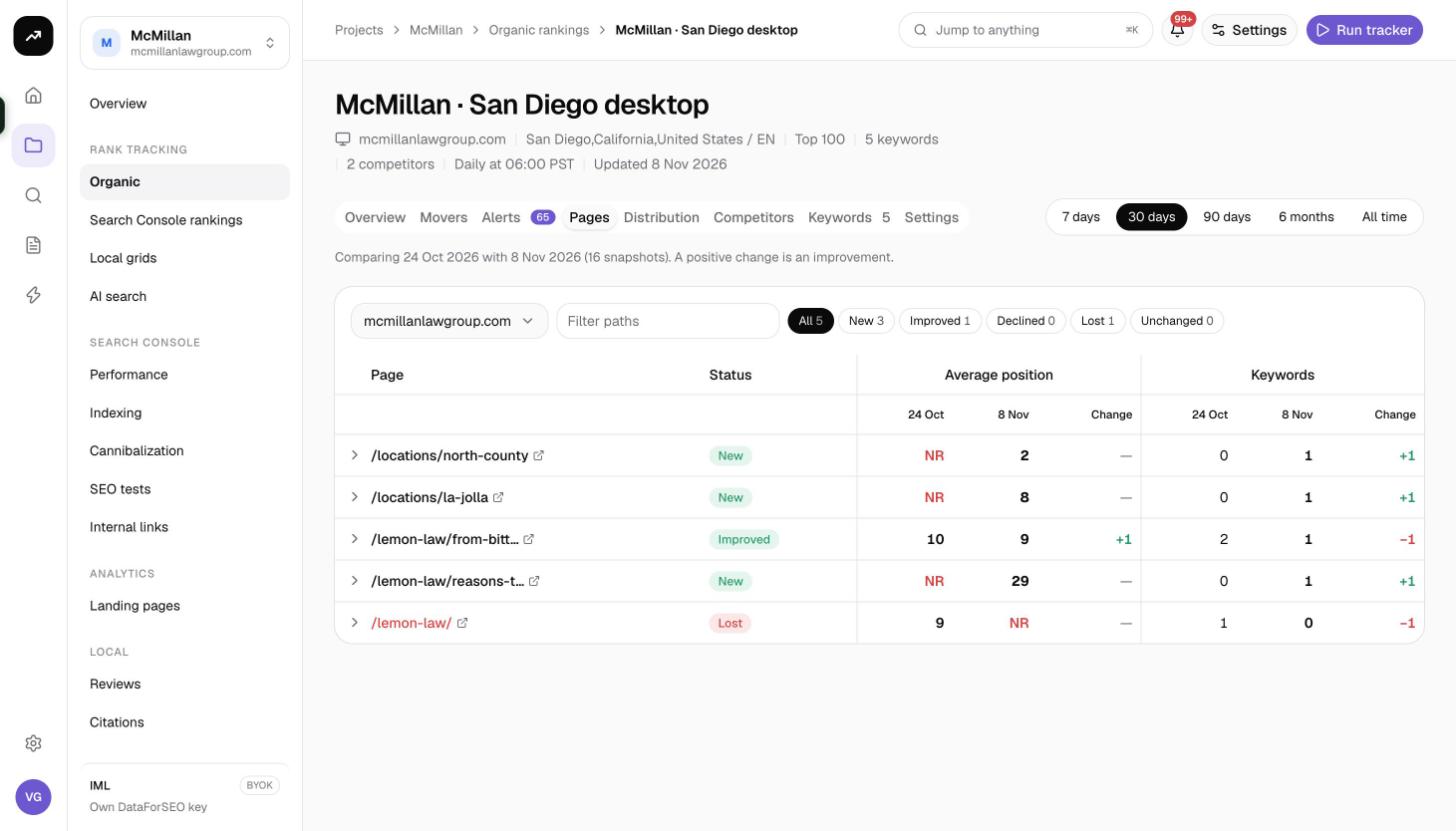
The Pages tab groups your keywords by the URL that ranks for them, so you can see which pages carry the traffic and which have slipped.
Controls:
- A domain picker, so you can look at a competitor's pages as well as your own.
- A path filter to find pages by part of their URL.
- Status chips: all, new, improved, declined, lost, unchanged.
Columns:
- Page: the URL.
- Status: New (ranks on the to date but not the from date), Improved, Declined, Lost (ranked before, not now) or Unchanged.
- Average position: from, to and Change, averaged over the keywords the page ranks for.
- Keywords: from, to and Change, the number of tracked keywords the page ranks for on each date.
Expand a row to list the keywords behind that page with their positions.
Tip: A page marked Declined with a growing keyword count is often fine; it picked up new long-tail rankings at lower positions, which pulls the average down. Check the expanded keyword list before acting.
Distribution tab
The Distribution tab counts keywords per position band for every tracked domain, on the from and to dates of the selected period. Bands are Top 3, Top 10, Top 20 and Top 100. For each band it also breaks the movement down into New, Improved, Lost, Declined and Unchanged, so you can tell whether a growing Top 10 came from fresh keywords or from keywords climbing out of positions 11 to 20.
The Rank distribution card on the Overview shows a simpler version for the latest date, with bands 1–3, 4–10, 11–20, 21–50, 51–100 and Not ranking.
Competitors tab
The Competitors tab is not limited to the competitors you track. It lists every domain found in the top 20 of every tracked result page on the latest day, which makes it the quickest way to discover who really competes for your keyword set.
- Hide tracked domains removes your own domain and the competitors you already track, leaving only new names.
- Columns: Domain (with You and Tracked badges), Visibility % (weights positions by expected click share, so a position 1 counts far more than a position 15), Keywords (how many of your keywords the domain ranks for), Avg. position and Std. deviation (how spread out its positions are).
- Track adds the domain as a competitor, up to 10 per tracker. Its positions are recorded from the next run; past snapshots are not re-read.
The SERP archive
Every check keeps a compact copy of each keyword's result page: the top 20 organic results, the local pack, up to 10 People Also Ask questions, the result types present, the total result count and a link to open the same search on Google. This is the SERP archive, and it lets you answer "what did Google show on that day" without re-running anything.
To open it:
- On the Overview tab, find the keyword and click its row to expand it.
- Choose the SERP on {date} tab. The date follows the to date of your period; change the period to look at another day.
- Read the page: feature badges along the top, the result count, an Open on Google link, the local pack with ratings, the organic list with #, Result and Domain columns, and the People also ask questions underneath.
The History tab next to it plots the position of each domain over the selected period, with a strip for your local-pack position.
Note: The archive keeps the top 20 organic results of each page even on a Top 100 tracker. Positions 21 and deeper are still recorded for your domain and your competitors; they are just not listed in the archived page.
Costs
Cost: The Pages, Distribution and Competitors tabs and the SERP archive are read from stored snapshots and cost nothing. Only the scheduled and manual checks that create snapshots are charged, at 0.6 to 4 credits per keyword depending on depth.
Tips and gotchas
- The Competitors tab reads the latest day only. If a run failed or was skipped, it shows the last successful snapshot.
- Visibility is a share of expected clicks across your keyword set, so it rewards head-term positions and is a better single number for "who is winning" than keyword count.
- Client share pages include the Pages, Distribution and Competitors tabs and the SERP archive, but not Alerts or Settings. See Client sharing.
- Use the Pages tab with a competitor domain selected to see which of their URLs you are fighting; it is often a handful of pages.