Create a rank tracker
Set up an organic rank tracker with a market, device, depth, keywords, competitors, alerts and a schedule, and learn what happens after the first check.
An organic rank tracker checks Google positions for your domain on a schedule, together with up to 10 competitors, the SERP features present on each result page and the local pack. One tracker covers one SERP: a market, a language and a device. Create another tracker for mobile or for a second country.
Before you start
- Trackers live inside a project. Open your project and go to Rank tracking › Organic, then click New rank tracker. The form starts from the project's domain, market, language and device, so set those first under project settings if you have not yet (see Projects).
- Organic tracker keywords count toward your plan's tracked-keyword cap, across the whole organization. The form shows how many you have left.
- Viewers cannot create trackers. You need the member, admin or owner role (see Members and roles).
Step by step
1. Target
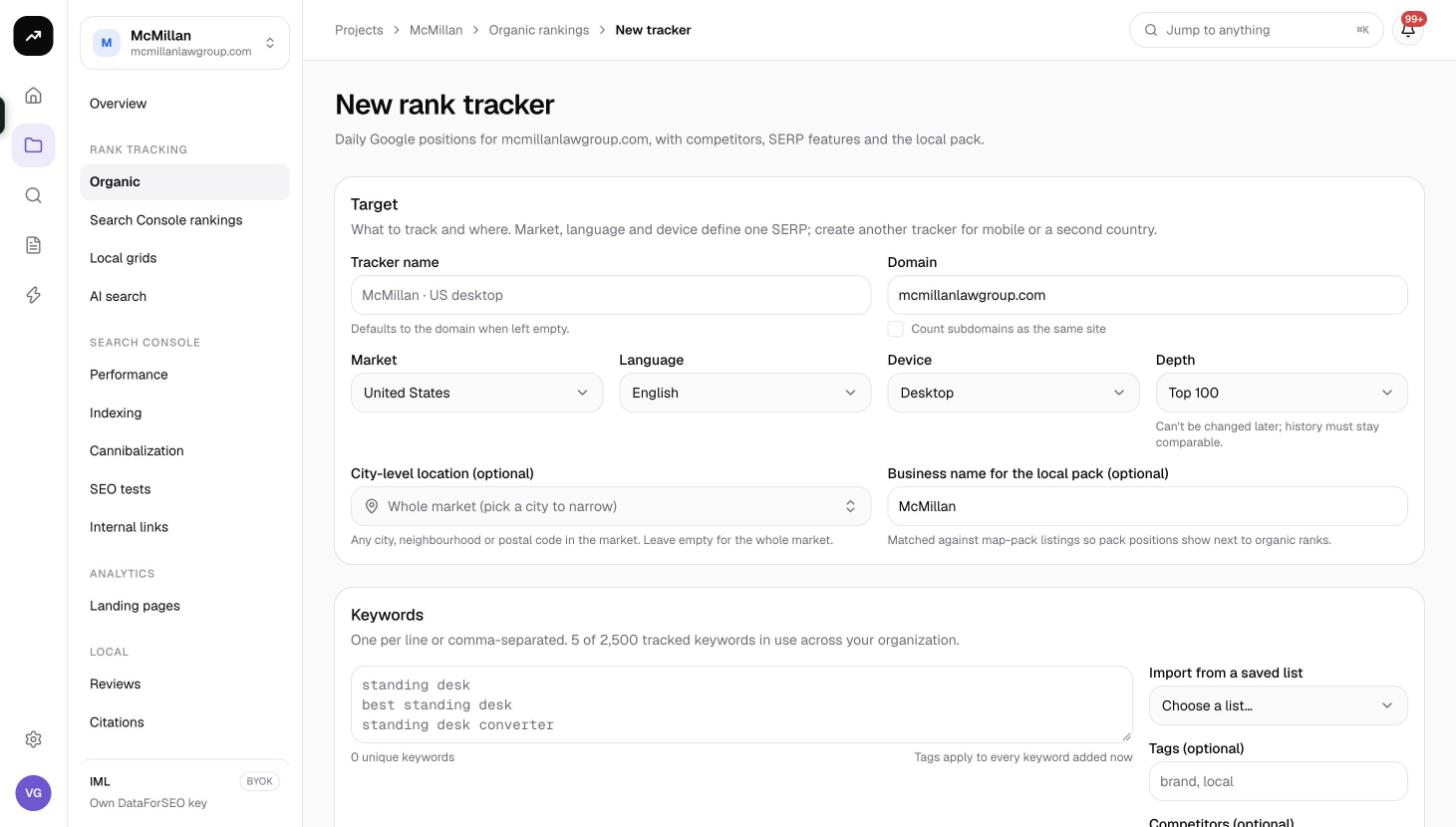
The Target card defines the SERP. Its hint says it plainly: market, language and device define one SERP; create another tracker for mobile or a second country.
| Field | What it does | Default |
|---|---|---|
| Tracker name | The name shown in lists, cards and notifications. | The domain |
| Domain | The site whose positions are recorded. | The project domain |
| Count subdomains as the same site | When ticked, a result on blog.example.com counts as a ranking for example.com. |
Off |
| Market | The country whose Google results are fetched. Changing it switches the language to that market's default. | The project market |
| Language | The interface language of the search. | The market's default |
| Device | Desktop or Mobile. | The project default |
| Depth | Top 10, Top 20, Top 50 or Top 100. How deep each check reads the results. | Top 100 |
| City-level location (optional) | Any city, neighbourhood or postal code in the market. Leave empty to search the whole market. | Empty |
| Business name for the local pack (optional) | Matched against map-pack listings so pack positions show next to organic ranks. | Your first brand name |
Warning: Depth cannot be changed later, because history must stay comparable. The same is true of market, language and device. Pick the depth you can afford at your cadence; the cost difference is large (see Costs below).
2. Keywords
The Keywords card takes one keyword per line or a comma-separated list. Under the box you see how many tracked keywords are in use across your organization and how many you have left.
- Up to 5,000 keywords per tracker. Keywords are lowercased, deduplicated and cut at 120 characters.
- A live counter reads "N unique keywords" and warns when the list "exceeds the N left on your plan". While you are over the cap, Create tracker is disabled.
- Import from a saved list pulls keywords from a list you saved during research (see Saved lists).
- Tags (optional): up to 20 tags, applied to every keyword you add now. Tags power the filters in every tab later, so tag by topic, page or client priority.
- Competitors (optional): up to 10 domains tracked on the same SERPs. Their positions are recorded in the same checks as yours.
If you go past the cap, the form explains the gap: "This would track N keywords; your plan allows N. Remove N keywords or archive another tracker." Plan caps are listed under Plans and pricing.
3. Schedule
The Schedule card decides when checks run. Runs start at the chosen hour in the chosen timezone, and each run fetches a fresh result page for every keyword.
| Field | Options | Default |
|---|---|---|
| Rerun every | On demand only, Day, 2 days, 3 days, Week, 2 weeks, 30 days | Day |
| Start hour | 00:00 to 23:00 | 06:00 |
| Timezone | Any IANA timezone; common ones are suggested | Your browser's timezone |
| Run on any day of the week | On, or untick to pick weekdays (Mon to Fri preselected) | On |
When you restrict weekdays, a run that falls due on another day waits for the next selected day. Below the fields, a cost line shows the price per keyword at your depth, the cost per run and an estimate per month at this cadence. It warns when your balance is too low for even one run.
Leave Run the first check right away ticked (the default) so the tracker fills with data immediately, then click Create tracker.
What happens after creation
- The first check is queued and runs straight away if you kept the option on. The tracker opens with a system note "Tracker created with N keywords", which you will see as a marker on the position chart.
- Until the first check completes, keyword cells show Pending. The tooltip reads "Added since the last check; positions will update shortly." If the tracker has never run, the table says "Positions appear after the first run."
- Each check records the best organic position of your domain and of every competitor, your local-pack position (matched by business name) and competitor pack positions (matched by domain), plus a compact copy of the result page for the SERP archive.
- The snapshot is dated by the calendar day in the tracker's timezone, so one snapshot per day is the normal rhythm.
- From then on the schedule takes over. You can also click Run tracker at any time; the button shows Running… while a job is queued or in progress.
Adding keywords later
When you add keywords to a tracker that has already run, only the new or restored keywords are checked right away through a partial run. Every other keyword keeps its last position in the new snapshot, and the last-run time and schedule are untouched. A banner reads "N keywords added. Checking positions now; the table will update shortly, please wait", and the new rows show Pending until the partial check lands, usually within minutes. If the partial check cannot be paid for, the banner says the positions will appear on the next run instead.
Costs
Cost: Each check costs 0.6 credits per keyword at Top 10, 1.0 at Top 20, 2.4 at Top 50 and 4.0 at Top 100. A daily tracker with 100 keywords at Top 100 is about 400 credits a day; the same tracker at Top 20 is about 100. A partial run after adding keywords costs only the new keywords.
Estimates are shown before a run; the real debit is the measured data cost. On a lifetime license the cost line shows an estimate in dollars on your own data account instead, starting at about $0.002 per keyword for the first 10 results plus $0.0015 for each further page of 10. See Credit costs by tool.
Tips and gotchas
- Set the business name even for a non-local brand if you ever appear in a map pack; without it, pack tracking is skipped entirely.
- Use a city-level location only when your customers search from one place. For a national brand, the whole-market SERP is more representative.
- Tags are cheap and reversible; depth, market, language and device are not. When in doubt, create two small trackers rather than one wide one.
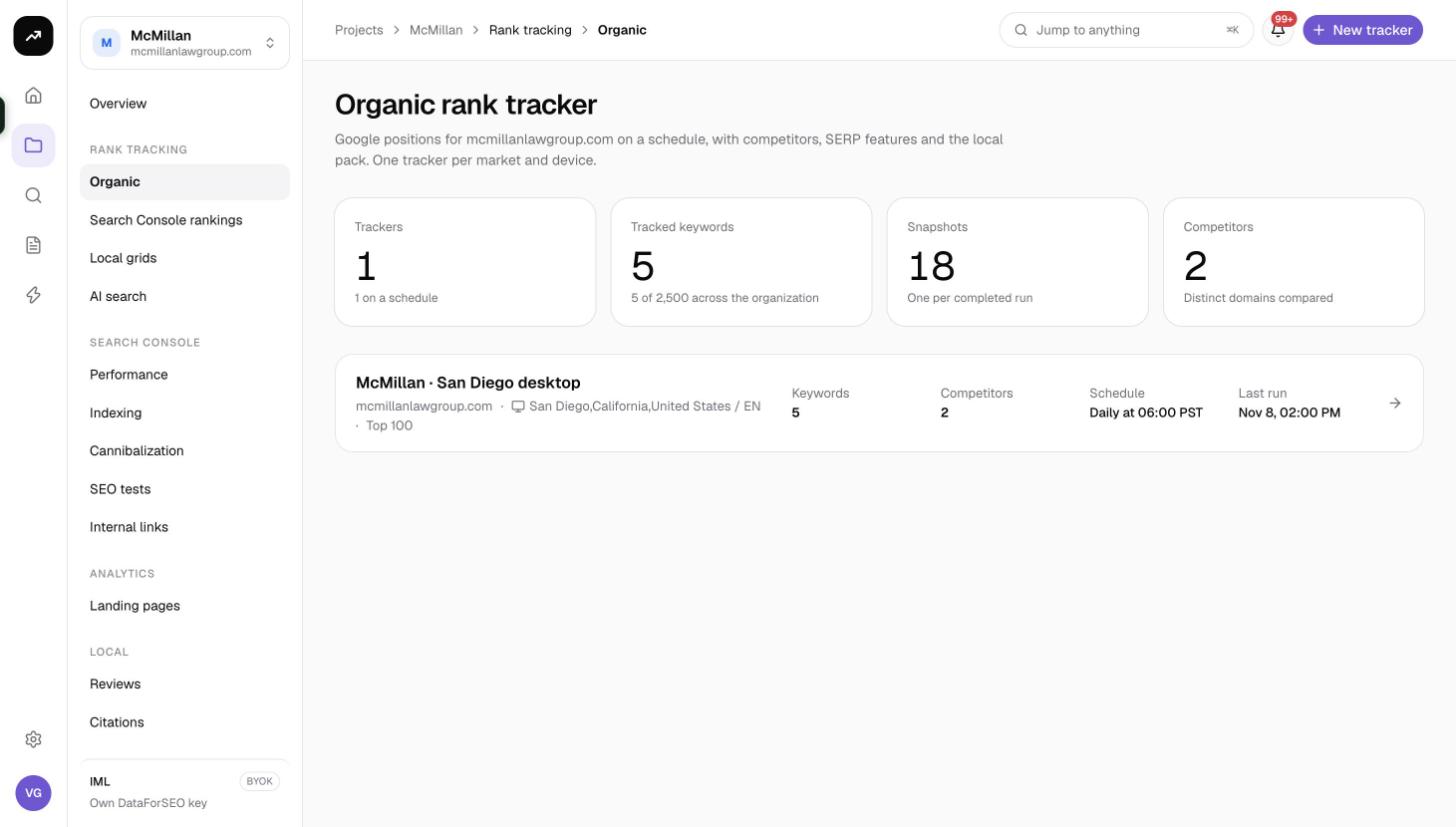
- One tracker per market and device is the intended pattern, and the list page shows every tracker as a card with domain, device, location, depth, keyword count, competitors, schedule and last run.