Ads Vision
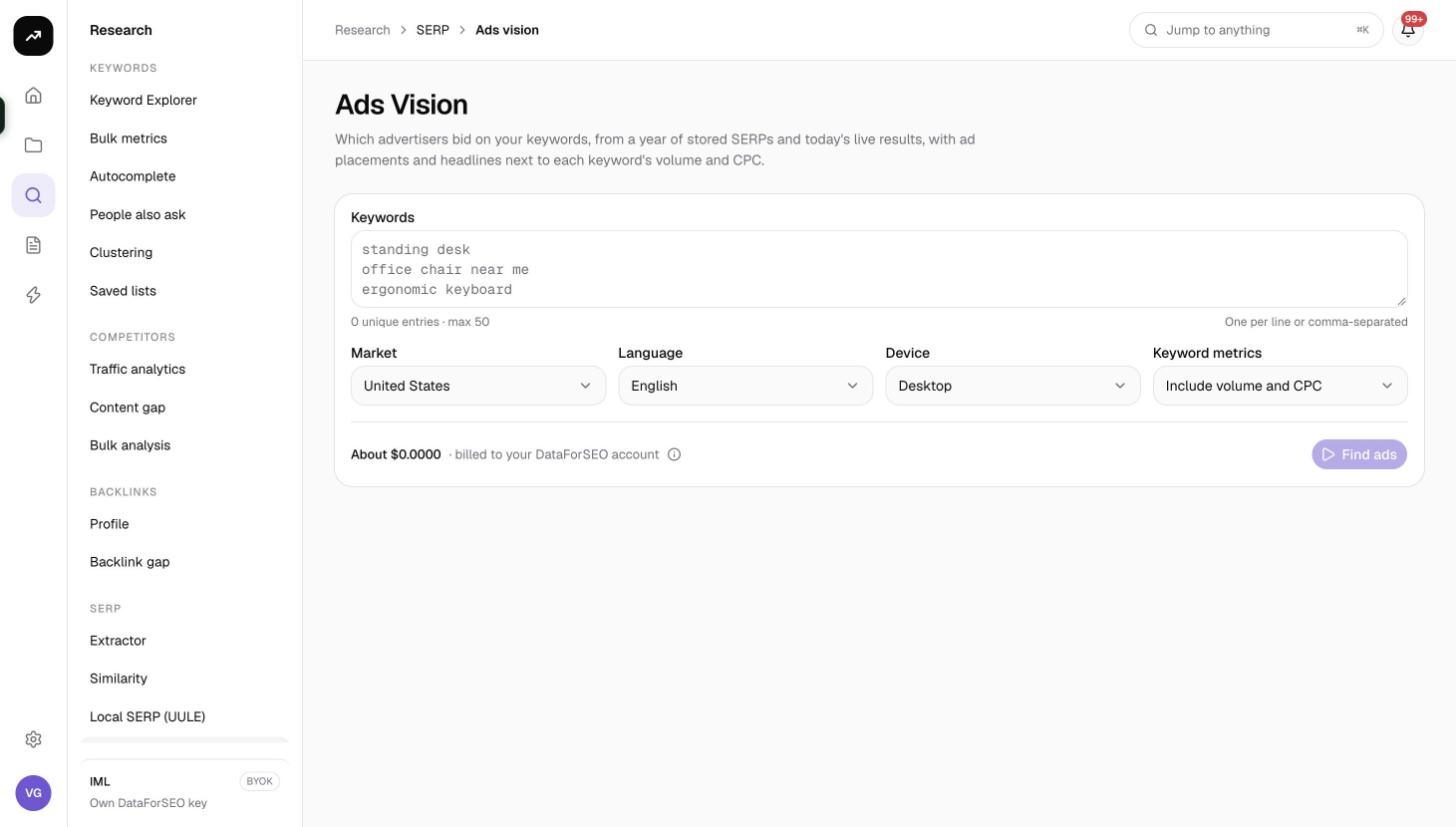
Find out which advertisers bid on your keywords, from a year of stored SERPs and today's live results, with ad placements and headlines next to each keyword's volume and CPC.
Ads Vision shows who is paying to appear on your keywords. It combines twelve months of stored search results with a fresh live check, so you see both the advertisers that have been bidding consistently and the ads showing today, with their headlines, placement and the keyword's volume and CPC alongside.
What it does
For each keyword SmarterSEO runs three lookups:
- Historical SERPs: the paid results stored for that keyword over the last 12 months, which is where the Advertisers tab comes from.
- A live SERP at depth 10 with Google's ad-testing flag switched on, which fills the Live ads and Live advertisers tabs.
- Optionally, one Google Ads metrics request per run for search volume, CPC and competition, when Keyword metrics is set to include them.
The result is a picture of ad pressure per keyword and a list of the domains competing for it.
Before you start
- You need a role that can run tools; viewers see Viewers can't run tools.
- Prepare 1 to 50 keywords, one per line.
- Decide whether you need volume and CPC. Include volume and CPC (the default) adds 20 credits per run; Ads only skips it.
- Check the estimate against your balance. The button is disabled with This run needs X credits but the organization has Y. when the estimate is too high.
Step by step
- Open Research, then Ads Vision in the SERP group, or go to
/research/serp/paid. - Paste 1 to 50 keywords into Keywords.
- Set Market (default United States) and Language (default English). Set both; the language does not follow the market.
- Pick Device (Desktop or Mobile). Mobile SERPs tend to carry more ads in automated checks.
- Choose Keyword metrics: Include volume and CPC (default) or Ads only.
- Read the cost line, then click Find ads. The page shows Reading ads… and updates automatically when the run is Ready.
Reading the results
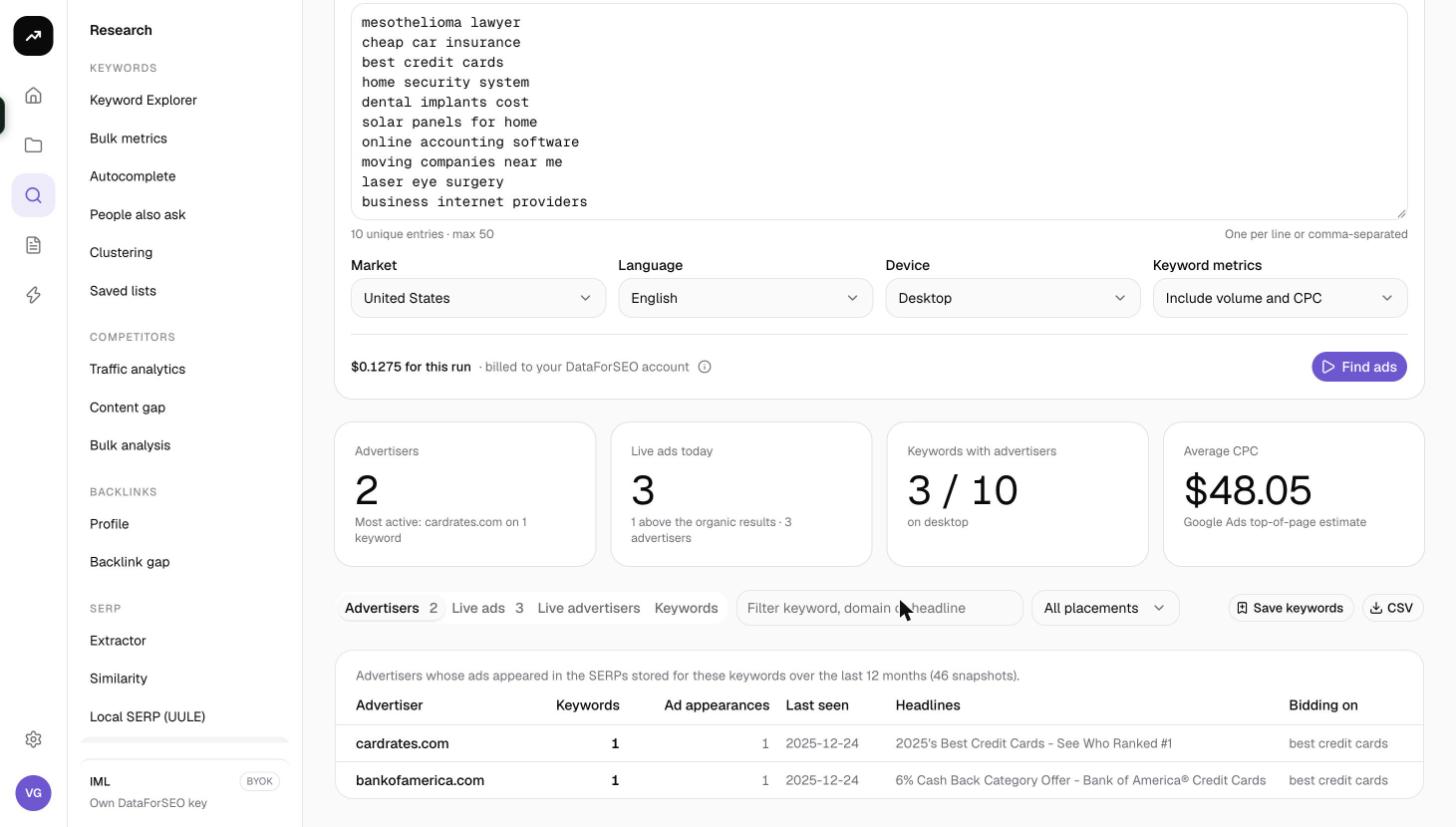
Tiles
- Advertisers: how many distinct advertiser domains appear in the stored SERPs, with the most active one named ("Most active: example.com on N keywords").
- Live ads today: the number of ads returned by the live check, with how many sit above the organic results and how many advertisers they belong to.
- Keywords with advertisers: how many of your keywords had at least one advertiser, out of the total, with the device used (or the number of failed SERPs).
- Average CPC: the Google Ads top-of-page estimate averaged across your keywords, or "Metrics not requested" if you chose Ads only.
Controls
Above the tabs you can type a filter, choose a placement (All placements, Top of page, Bottom of page) and click Save keywords to store your keywords with their volume and CPC in a saved list. The CSV button exports the live ads only.
Advertisers tab
Built from the stored SERPs, so it is the reliable view of who bids over time. Columns:
- Advertiser: the advertiser domain.
- Keywords: how many of your keywords it advertised on.
- Ad appearances: how many stored SERPs it appeared in.
- Last seen: when it was last recorded.
- Headlines: the headline texts it has used.
- Bidding on: the keywords it was seen on.
Live ads tab
Every ad found in today's live check: Keyword, Placement (top or bottom of page, with the slot number), Ad (headline and description) and Advertiser. Use the placement select to see only above-the-fold ads.
Live advertisers tab
The live ads grouped by advertiser, with their headlines, so you can compare the current messaging of each competitor side by side.
Keywords tab
"Ad pressure per keyword": one row per keyword with Advertisers (distinct advertisers across stored and live data), Live ads, Top, Bottom, Shopping (ad counts by placement in the live SERP), and, when metrics were requested, Volume, CPC and Competition.
Costs
Cost: 6.6 credits per keyword (one live top 10 SERP plus a year of stored paid results), plus 20 credits per run for volume and CPC when Include volume and CPC is selected. Live SERPs fetched in the last 24 hours are reused for free; keyword metrics are cached for 30 days. On a lifetime license the same lookups go to your own DataForSEO account.
Tips and gotchas
- Google serves ads inconsistently to automated checks. It is normal for Live ads today to be low or zero even on commercial keywords. The Advertisers tab, drawn from stored SERPs, is the better answer to "who advertises here"; the live tabs are a snapshot of this moment.
- Mobile SERPs tend to surface more ads in automated checks. If the live tabs are empty on desktop, try Mobile.
- The CSV button exports live ads only. To keep the historical advertiser list, copy it from the Advertisers tab.
- Save keywords stores volume and CPC with each keyword, so the list you build here already carries metrics when you reuse it elsewhere.
- Choose Ads only when you already have volume and CPC from Bulk keyword metrics and want to save the 20 credits.