SERP Similarity
Compare the top 10 for up to 50 keywords and group the ones Google treats as the same topic, so you know how many pages to create and which keywords each should target.
SERP Similarity answers one question: can these keywords share a page? It fetches the live top 10 for every keyword you enter, counts how many URLs each pair has in common, and groups the keywords that overlap. One page per group is usually the right content plan.
What it does
For each keyword SmarterSEO runs a live SERP at depth 20 and keeps the top 10 organic URLs. It then compares every keyword with every other keyword. When two keywords share at least the number of URLs you set in Group when sharing (default 3 of the top 10), they are placed in the same topic group. Grouping is greedy: a keyword joins the first group it qualifies for and is not reassigned afterwards. Keywords that match nothing are listed as standalone.
The result is a short list of groups, each with the keywords it contains and the URLs they share, plus a heatmap matrix of the pairwise overlaps.
Before you start
- You need a role that can run tools; viewers see Viewers can't run tools.
- Gather 2 to 50 keywords. The tool works best on a tight set of related terms (variations, modifiers, question forms) where you genuinely suspect overlap.
- Decide how strict you want to be. 3 shared URLs is a good default; 2 groups more aggressively, 5 or 6 only merges near-identical SERPs.
- Make sure your balance covers the estimate (1 credit per keyword). If it does not, the button is disabled with This run needs X credits but the organization has Y.
Step by step
- Open Research, then SERP Similarity in the SERP group, or go to
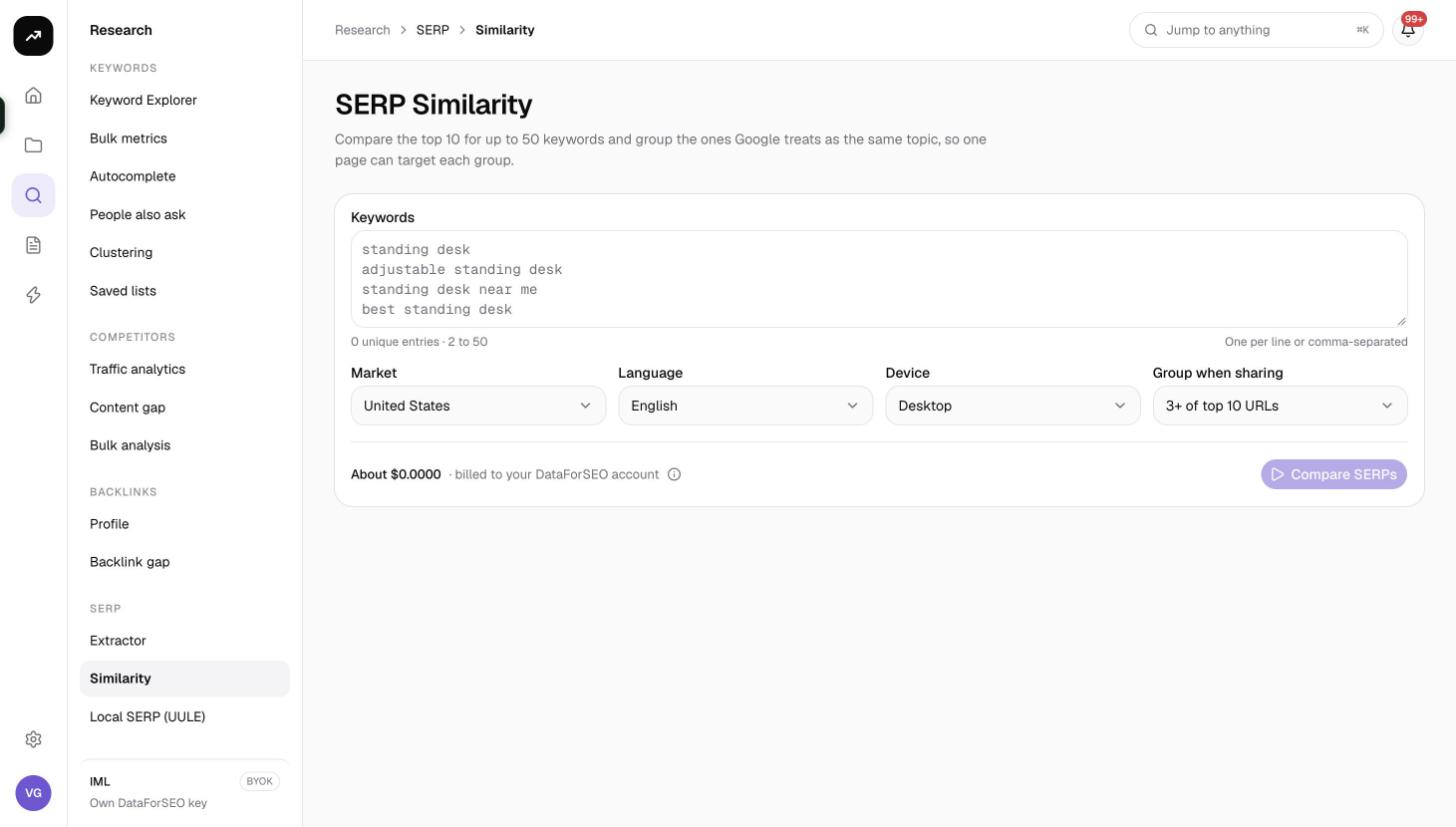
/research/serp/similarity. - Paste 2 to 50 keywords into Keywords, one per line.
- Set Market (default United States) and Language (default English). The language does not follow the market automatically.
- Pick Device (Desktop or Mobile).
- Choose Group when sharing: 2+, 3+ (default), 4+, 5+ or 6+ of top 10 URLs.
- Check the cost line, then click Compare SERPs. The page redirects to its permanent
?job=link, shows Comparing SERPs… while the job runs, and fills in automatically when it is Ready.
Reading the results
Tiles
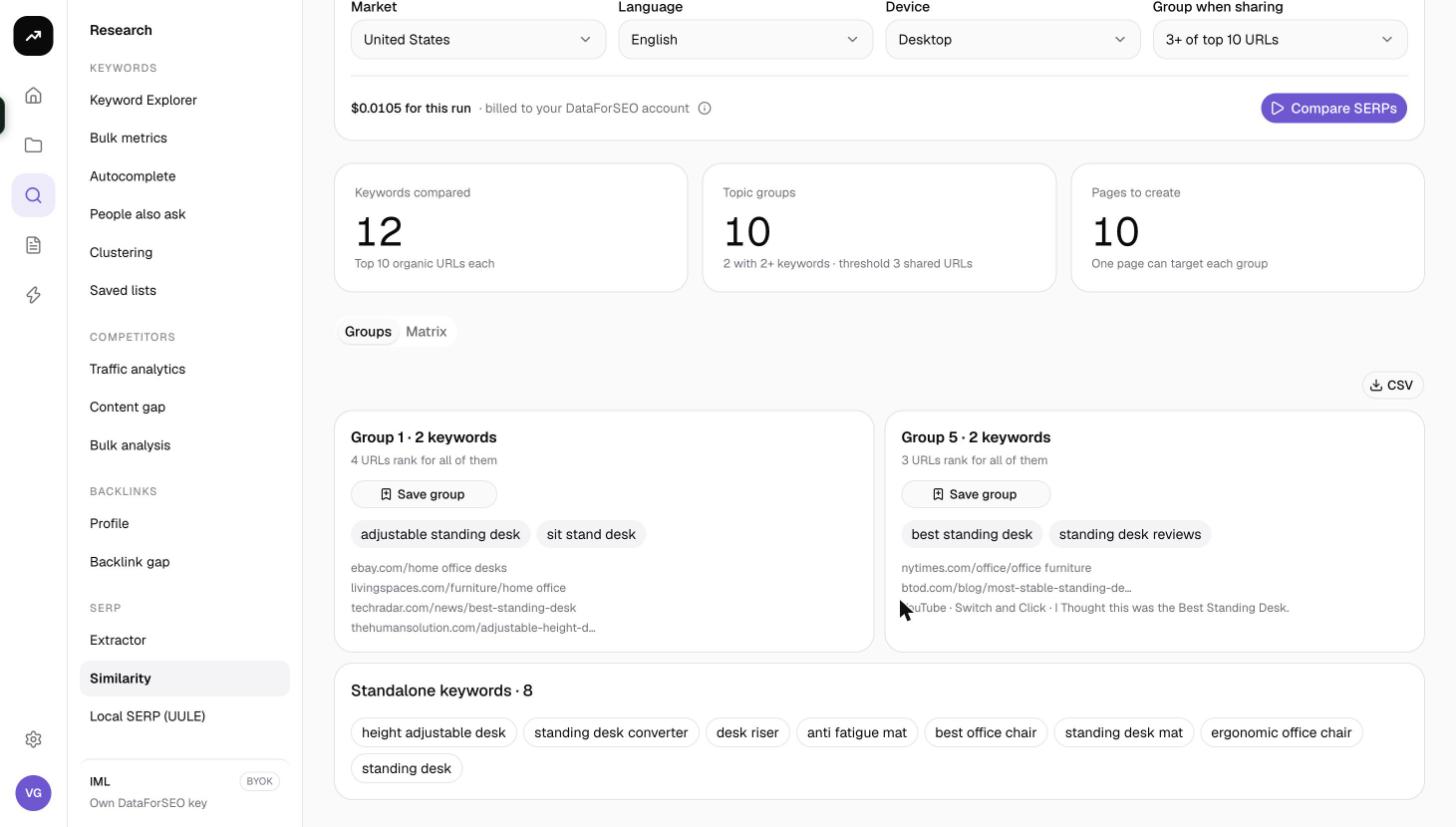
- Keywords compared: how many keywords had a SERP fetched. The hint shows "Top 10 organic URLs each", or how many SERPs failed.
- Topic groups: the number of groups formed, with how many contain 2+ keywords and the threshold used ("threshold 3 shared URLs").
- Pages to create: equals the number of groups, with the hint "One page can target each group". Standalone keywords each count as their own page.
Groups tab
The default tab. Each group is a card titled Group N · K keywords listing:
- The keywords in the group.
- Up to five of the URLs they share in the top 10, so you can see the pages Google already treats as the answer to the whole group.
- A Save group button that opens the Save to a keyword list dialog for just those keywords. Pick Existing list or New list, add Tags if you want to label the group, and save. Keywords already in the list are skipped.
Below the groups, a Standalone keywords card lists every keyword that did not reach the threshold with any other keyword. These need their own page, or a wider keyword set to find their neighbours.
The CSV button downloads the grouping so you can paste it into a content plan.
Matrix tab
A heatmap with your keywords on both axes. Each cell shows how many of the top 10 URLs the two keywords share; darker cells mean more overlap. Use it to sanity-check the grouping: a keyword that sits at 2 shared URLs with several groups might deserve a lower threshold, and a group whose members only overlap through one hub keyword might be worth splitting.
There is no filter or pagination on this tool; the result is small enough to read in one screen.
Costs
Cost: 1 credit per keyword (one top 20 SERP each). SERPs fetched in the last 24 hours for the same keyword, market, language and device are free. On a lifetime license the SERPs are charged to your own DataForSEO account.
Tips and gotchas
- Reworded queries overlap less than you expect. "best standing desk" and "standing desk reviews" often share only one or two URLs. Start at 3+ and drop to 2+ if everything ends up standalone.
- Grouping is greedy, so the order of your keyword list can change which group a borderline keyword lands in. If a result looks odd, run again with a different threshold rather than reordering.
- The tool compares the top 10 organic URLs only. Features such as People also ask or video carousels are not part of the similarity score.
- Mobile and desktop SERPs differ. Run on the device your audience uses.
- Because depth 20 SERPs are used, these fetches also prime the cache for SERP Extractor runs at Top 20 within 24 hours.
- Use Save group per group, then create one rank tracker from each saved list to track every page's keyword set separately.