Internal links
Crawl your site's body content to find orphan pages, priority targets that rank 4 to 20 with too few links, over-linked pages and repeated anchors, with suggested placements.
Internal links crawls your own pages, counts the links inside the main content and joins them with your Search Console positions and impressions. The result is a short list of pages that would move if they had a few more links from your own articles, plus the pages best placed to give them.
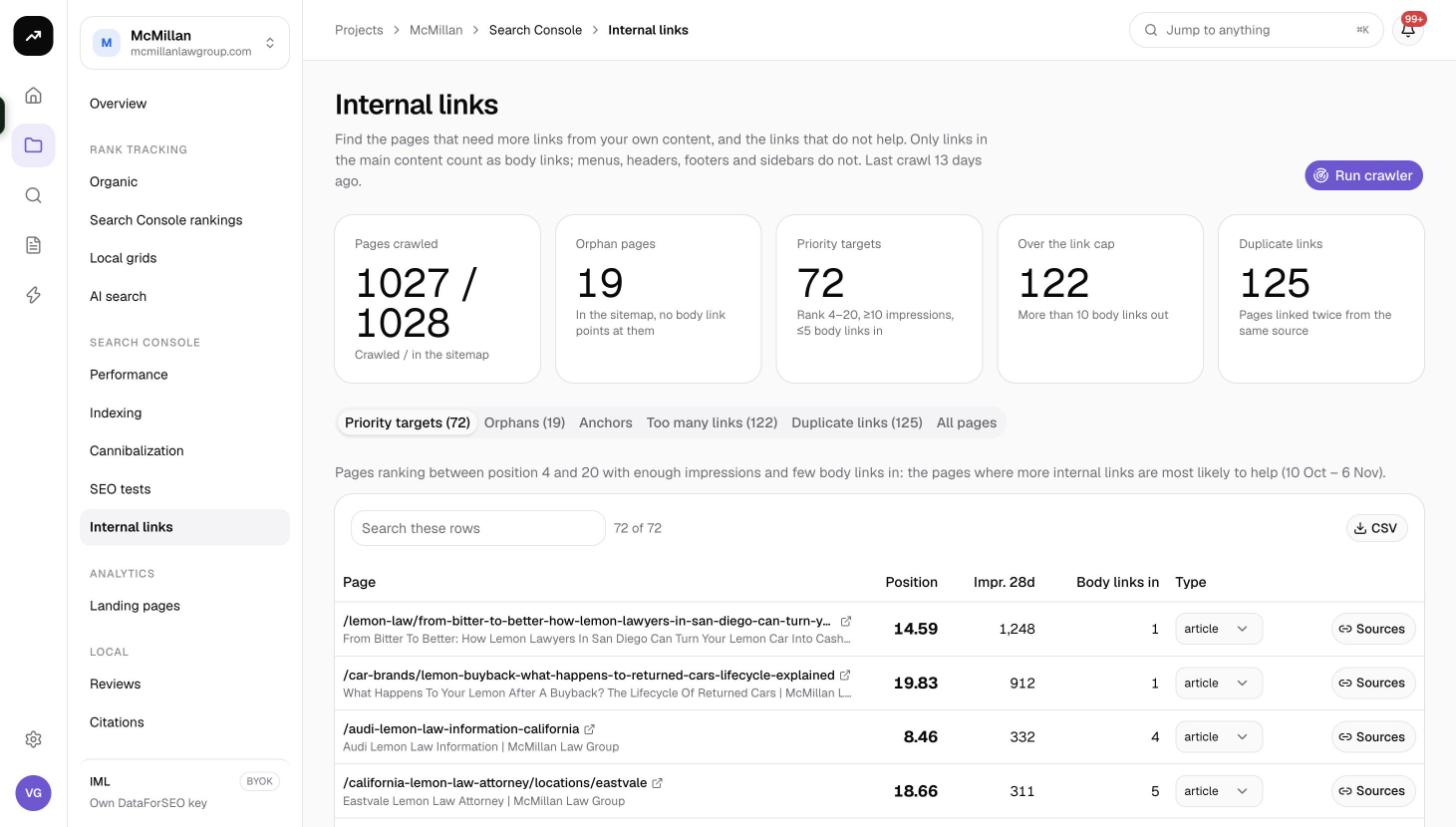
What it does
The page introduces itself as a way to "find the pages that need more links from your own content". Two choices make it different from a generic crawler:
- Only body links count. Links in menus, headers, footers and sidebars are ignored. A page linked only from the navigation is treated as an orphan, because that is how it looks to a reader and, in practice, to Google's understanding of what the page is about.
- Search Console decides the priority. A page ranking 4 to 20 with real impressions and few body links is the best possible candidate for internal linking, so those pages are surfaced first.
Cost: Free. The crawler runs on SmarterSEO's side and nothing is sent to a paid provider.
Before you start
- Link a Search Console property to the project so the crawl can be joined with positions and impressions. See Connect Google Search Console and GA4.
- Make sure the site has a sitemap reachable from robots.txt, or have the sitemap URLs or a list of pages ready to paste.
- Crawls are limited to 5,000 pages. For a larger site, paste the sections you care about.
Running the crawler
- Open the project's Search Console › Internal links page and click Run the crawler.
- Pick a source:
- Pages in the sitemap: SmarterSEO finds the sitemap through robots.txt, or you paste sitemap URLs. This replaces the current page list.
- Re-crawl known pages: fetch the pages from the previous crawl again to refresh link counts after you have made changes.
- Paste URLs: your own list, one per line.
- Set Crawl up to. The default is 2,000 pages and the maximum is 5,000.
- Click Start crawl.
The crawler fetches about four pages a second, so 2,000 pages take around eight minutes. You can leave the page; the person who started the crawl receives an email when it finishes if Reports and inspections is turned on (see Email notifications).
Reading the results
Tiles
| Tile | Meaning |
|---|---|
| Pages crawled | Pages fetched, shown against the number found in the sitemap. |
| Orphan pages | Pages with no body links pointing to them from any crawled page. |
| Priority targets | Pages ranking 4 to 20 with at least 10 impressions in 28 days and at most 5 body links in. |
| Over the link cap | Pages with more than 10 body links out. |
| Duplicate links | Pages linked from the same source page more than once, or anchors repeated more than 3 times for one page. |
The rules behind the tiles
- A priority target ranks between 4 and 20, has at least 10 impressions in the last 28 days, and has at most 5 body links pointing to it.
- The link cap is 10 body links out of one page. Above that each link passes less and the page reads like a list.
- The same anchor used more than 3 times for one target page is flagged as a duplicate, because varied anchors describe the target better.
Tabs
| Tab | What it lists |
|---|---|
| Priority targets | The pages that meet the priority rule, best opportunities first. |
| Orphans | Pages with no body links in. |
| Anchors | Per target page: Body links in, Sources, Distinct anchors, Diversity (distinct anchors as a share of links) and Most used anchor. |
| Too many links | Pages over the link cap, with Body links out. |
| Duplicate links | Pages with repeated links from one source, with Duplicate sources. |
| All pages | Every crawled page. |
Page tables share these columns: Page, Position, Impr. 28d, Body links in, and depending on the tab Body links out or Duplicate sources. The Type column classifies each page as article, legal, contact or utility; the dropdown lets you correct a page's type, which keeps privacy policies and contact pages out of the orphan and priority lists you act on. Each row also has a Sources button.
Sources: where to link from
Clicking Sources opens the Where to link from panel for that target. It lists your own pages that already rank for the same searches as the target but do not link to it yet, which makes them the most relevant possible sources. For each source, Find placements scans the page text and points at the sentences where a link would fit naturally, suggests anchor text, and gives you the link HTML to copy into your CMS.
A simple workflow
- Run the crawler from the sitemap.
- Open Priority targets and take the top five.
- For each, click Sources, pick two or three source pages, and use Find placements to add the links.
- Re-run with Re-crawl known pages after publishing. The targets' Body links in should rise and they should drop off the list.
- Check Orphans for pages you forgot exist, and either link to them or remove them.
Tips and gotchas
Tip: Fix the Type of legal, contact and utility pages the first time you see them in the Orphans tab. The setting is remembered, so later crawls stay clean.
Note: The crawler reads the HTML that the server returns. Links rendered only by client-side JavaScript after load are not seen.
- The impressions and positions come from the synced Search Console data for the last 28 days, so a new property needs its backfill to finish before priorities are meaningful.
- Pages in the sitemap replaces the page list. Use Paste URLs to add a few pages without discarding the rest.